GA4 first party cookies are small text files that the Google Analytics 4 tag saves on your own domain, so it can recognize a browser from one pageview and one visit to the next. The main one is _ga, which stores a random client ID. A second cookie, _ga_<container-id>, tracks the current session. The term "first-party" describes where the cookie is stored, not who wrote the code that set it.
This guide covers why these cookies matter, exactly which ones GA4 sets, how to inspect and configure them, where they hurt tracking accuracy, and what they mean for privacy and consent. You will leave knowing what to check on your own site.
At Nostra AI we build edge tools for ecommerce storefronts. Short cookie lifetimes and bot traffic both come up below.
GA4 first-party cookies matter because every user count, session count and attribution path in your reports is built on them. When the cookie is missing, expired or blocked, GA4 treats a returning shopper as a stranger.
A browser decides party status by comparing the cookie's domain with the domain in the address bar. The GA4 tag loads from Google's servers, but it writes the cookie with JavaScript on your page. That puts the cookie under your domain. This is why Google's documentation says GA4 tags use first-party cookies, and it clears up the common confusion about Google code producing "your" cookies. The script's origin does not matter. The cookie's domain does.
A cookie is first-party when it sits on your domain, no matter whose script put it there.
Several core metrics depend on the two cookies staying in place:

_ga cookie creates a "new" user.Core GA4 reporting does not need third-party cookies, which makes it less exposed to their decline than many ad platforms. It is still exposed to the limits of first-party storage, covered in the accuracy section below.
GA4 sets two core cookies, _ga and _ga_<container-id>. It adds advertising cookies only when Google Ads features are linked.
| Cookie | What it does | Default lifetime |
|---|---|---|
_ga |
Identifies a unique user with a client ID | 2 years |
_ga_<container-id> |
Persists session state. The container ID is your measurement ID without the "G-" | 2 years |
_gac_<property-id> |
Holds campaign data for Google Ads conversion linking, when accounts are linked | 90 days |
_gcl_au |
Used by Google's conversion linker for ad attribution | 90 days |
The two-year lifetime renews each time the visitor returns, so an active visitor keeps the same ID. Older guides also mention _gid and _gat. Those belong to Universal Analytics, and GA4 does not need them.
A typical _ga value looks like GA1.1.1234567890.1700000000. The last two parts are a random number and the timestamp of the first visit. Together they form the client ID. Google has changed the layout of the session cookie value over the years, including in 2025, so never build reports that parse it. Treat both cookies as opaque.
GA4 needs only two cookies for core measurement: one for the person, one for the session.
You can verify GA4 cookies in about two minutes in Chrome, then change their behavior with settings on your Google tag.
_ga and _ga_ followed by your measurement ID.collect to see GA4 hits being sent.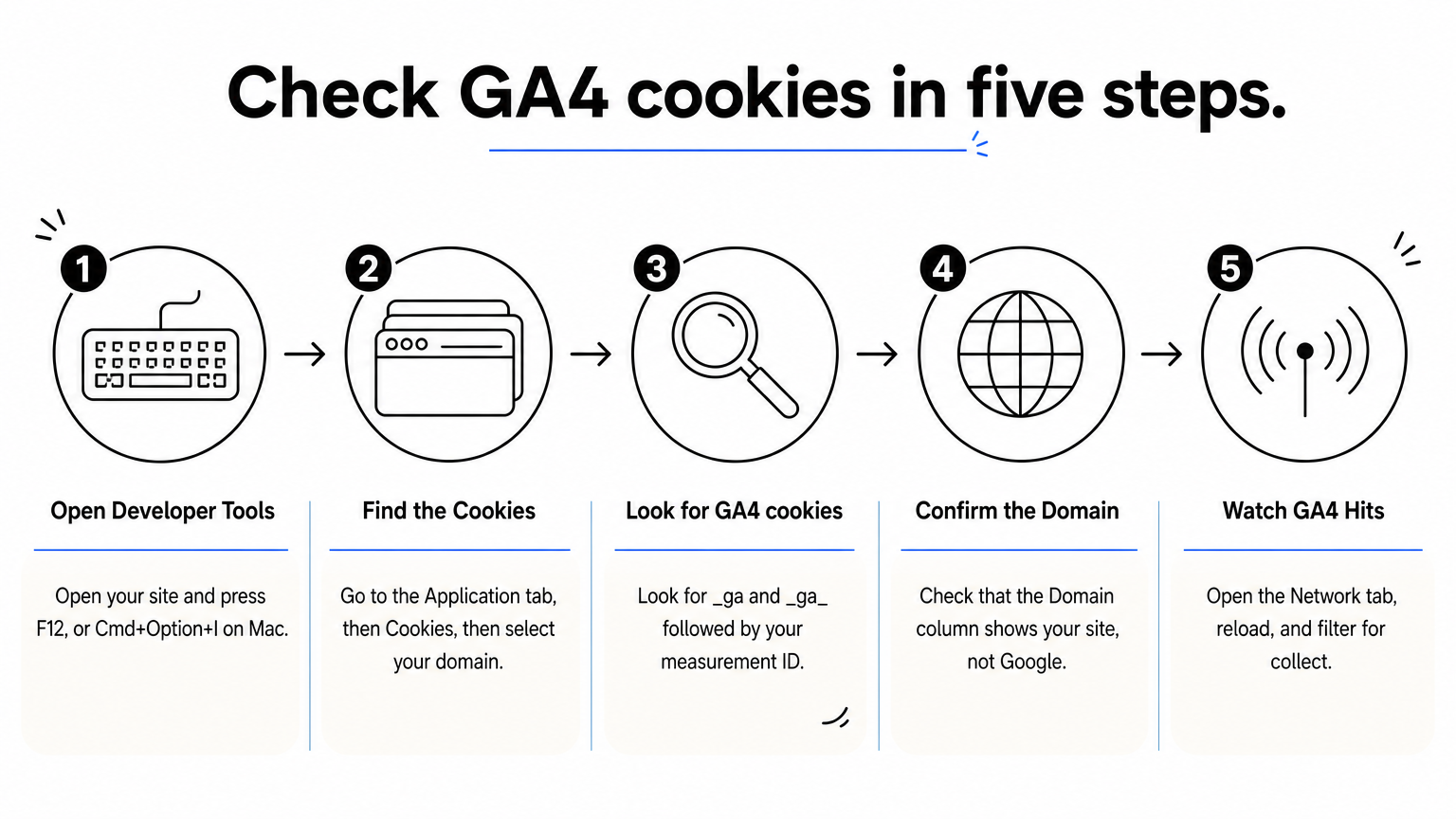
If the cookies are missing, a consent banner, ad blocker or misplaced tag is the usual cause.
Your Google tag accepts settings such as cookie_expires (in seconds), cookie_domain, cookie_prefix and cookie_flags. The snippet below sets consent to denied by default and shortens the cookie lifetime to 90 days. Consent defaults must run before the config call.
gtag('consent', 'default', { analytics_storage: 'denied' });
gtag('config', 'G-XXXXXXX', { cookie_expires: 7776000 });
With analytics_storage denied, the tag neither reads nor writes the analytics cookies until your banner grants consent. Shortening the lifetime reduces retention but makes returning-visitor data less accurate.
Set consent defaults before the config call, or the cookies get written before the visitor has chosen.
GA4's first-party cookies are fragile in practice. Browser limits, deletion, blockers, denied consent and bot traffic all distort the counts.
Safari's Intelligent Tracking Prevention caps cookies written by JavaScript at seven days. Take a shopper on Safari who clicks an ad on January 1 and buys on January 12. GA4 sees two different users, and the sale is likely credited to direct traffic instead of the ad. Private browsing, manual cookie clearing and ad blockers that stop the GA script cause similar splits. Server-side tagging on your own subdomain can help, but the result depends on how it is set up.
Crumble, the cookie agent behind Nostra AI's Edge ID, extends a customer's first-party cookie life from 7 days to up to 2 years and recovers lost identities. It works with GA4, Meta, Google and Klaviyo, and Nostra reports that 99% of visitors are still recognized after 28 days.
Bots are the other problem. A bot that runs JavaScript gets its own _ga client ID, which inflates users and sessions. GA4 excludes known bots and spiders automatically, but less obvious ones get through. Knox, Nostra AI's bot agent, blocks malicious bot traffic at the edge before it reaches your analytics.
Longer cookie life fixes the people you lose. Bot filtering fixes the people who were never there.
First-party status does not exempt GA4 cookies from consent rules. What you need depends on where your visitors live, so treat this as a practical overview, not legal advice.
In the EU and UK, analytics cookies generally need prior consent, with narrow exceptions that vary by regulator. The United States has no federal cookie consent law. Instead, state privacy laws such as California's require clear notice and an opt-out of the sale or sharing of data and of targeted advertising. Several states also require honoring opt-out signals such as Global Privacy Control. Disclose the cookies from the table above, with their lifetimes, in your privacy policy.
As a visitor, first-party cookies are generally lower risk than third-party ones. They still track you across visits on that site.
A cookie being first-party changes who stores it, not whether you need to tell visitors about it.
Google's Consent Mode passes visitor choices to your tags through four signals: analytics_storage, ad_storage, ad_user_data and ad_personalization. When analytics storage is denied, GA4 sends cookieless pings instead of setting cookies. It can model some of the missing behavior once your property meets Google's data thresholds. Expect partial data from visitors who decline, and test your banner by denying consent and confirming no _ga cookie appears.
GA4 first-party cookies are two cookies you can inspect in a minute: _ga for the person and _ga_<container-id> for the session. Their accuracy depends on how long they survive, whether bots create fake ones, and whether visitors consent. Check them in DevTools, set consent defaults correctly, and document them in your privacy policy.
Clean cookie data starts with clean traffic. If bots are inflating your users and sessions, see how Edge Protect blocks bad bots before they reach your site and your GA4 reports.


