
What is FID in Core Web Vitals? First Input Delay (FID) measured the gap between a visitor's first click, tap, or key press and the moment the browser could begin responding to it. Google counted it as a Core Web Vital until March 2024, when Interaction to Next Paint (INP) took its place. The three metrics that matter now are Largest Contentful Paint (LCP), INP, and Cumulative Layout Shift (CLS).
This article covers how FID worked, how it was scored, and why Google retired it. You will also see how INP differs, which vitals deserve your attention first, and how to measure and improve responsiveness on a real site. Every threshold below comes from Google's published guidance.
At Nostra AI, we run speed and traffic agents at the edge of ecommerce storefronts, so we see how these metrics play out on product pages, carts, and checkouts. That context shapes the practical advice here, especially the last section on online stores.
FID mattered because it turned the first impression of responsiveness into a number you could track. Google retired it because that number captured only a thin slice of how a page actually feels to use.

FID measured input delay, the time from a visitor's first interaction to the moment the browser could start running event handlers. The delay exists because the browser's main thread is often busy parsing and executing JavaScript during page load. While it works, it cannot respond to a tap.
Google scored FID at the 75th percentile of page loads, split by mobile and desktop. That means three out of four visits had to meet the threshold for your page to pass. Because FID needs a real person to interact, it could only be collected as field data, never in a lab test.
| Rating | FID value |
|---|---|
| Good | 100 ms or less |
| Needs improvement | 100 ms to 300 ms |
| Poor | More than 300 ms |
FID counted only discrete actions such as clicks, taps, and key presses. Scrolling and zooming were excluded. Visitors who never interacted produced no FID value at all.
FID had three built-in blind spots. First, it looked only at the first interaction. A page could respond instantly to the first tap and then freeze on the fifth, and FID would never notice.
Second, it measured only the delay before processing began. It ignored how long the event handler ran and how long the browser took to paint the result. A button that waited 10 ms and then needed a full second to update still earned a perfect score.
Third, the threshold was easy to meet. The large majority of sites passed, so the metric stopped separating sluggish pages from responsive ones.
FID told you whether the browser was ready to listen, not whether the page felt fast to use.
Google promoted INP to a stable Core Web Vital on March 12, 2024, replacing FID. If you still see FID in an old report, a dashboard template, or a vendor audit, treat it as a legacy number. Knowing what FID in Core Web Vitals once measured helps you read those reports, but you should not optimize for it anymore.
INP differs from FID in one big way: it judges responsiveness across the whole visit and counts the full time until the screen updates. FID looked at one moment and one stage of the process.
| Aspect | FID (retired) | INP (current) |
|---|---|---|
| Interactions counted | First only | All clicks, taps, and key presses |
| Latency stages | Input delay only | Input delay, processing time, and presentation delay |
| Reported value | The first interaction | One of the slowest interactions of the visit |
| Good threshold | 100 ms or less | 200 ms or less |
| Poor threshold | More than 300 ms | More than 500 ms |
| Core Web Vital status | Until March 2024 | Since March 2024 |
The thresholds are not directly comparable. INP includes far more of the experience, so its "good" bar of 200 ms is a stricter test than FID's 100 ms was.
For every interaction, the browser records the time from the user's input until the next frame is painted. That latency has three parts: input delay (waiting for the main thread), processing time (running your event handlers), and presentation delay (rendering and painting the update).
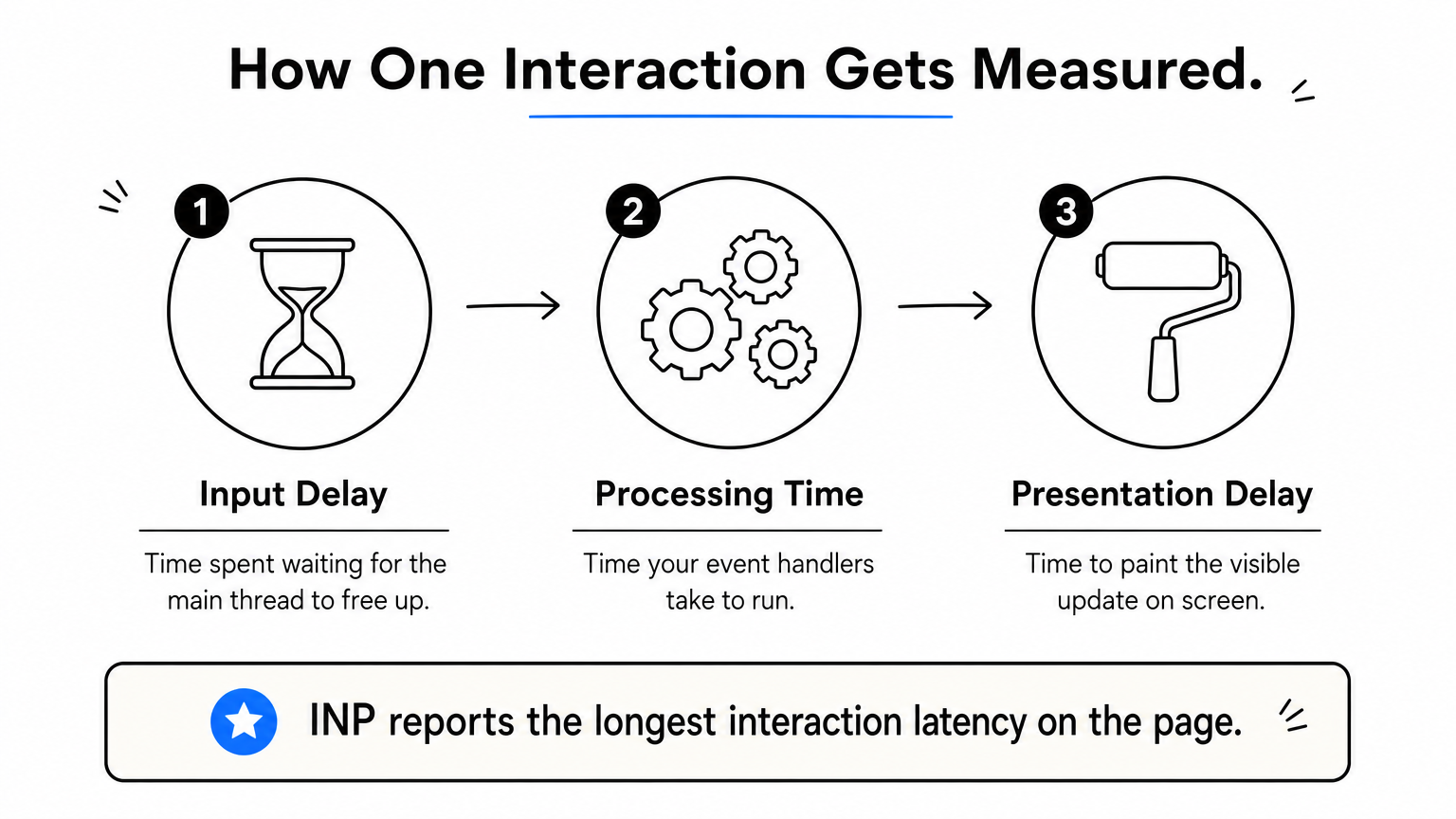
A page's INP is then the longest of those interaction latencies. On pages with many interactions, the browser ignores one outlier for every 50 interactions, so a single freak hiccup does not define the score. As with FID, Google assesses INP at the 75th percentile of visits.
| Rating | INP value |
|---|---|
| Good | 200 ms or less |
| Needs improvement | 200 ms to 500 ms |
| Poor | More than 500 ms |
INP asks a harder question than FID did: when someone used your page, how long did they wait to see something happen?
The current Core Web Vitals are LCP, INP, and CLS, and no single one outranks the others. A page passes the assessment only when all three are in the good range, so the metric that matters most is whichever one you are failing.
| Metric | What it measures | Good | Needs improvement | Poor |
|---|---|---|---|---|
| LCP | How quickly the largest visible element renders | 2.5 s or less | 2.5 s to 4 s | Over 4 s |
| INP | How quickly the page responds to interactions | 200 ms or less | 200 ms to 500 ms | Over 500 ms |
| CLS | How much the layout shifts unexpectedly | 0.1 or less | 0.1 to 0.25 | Over 0.25 |
Each one maps to a different frustration. LCP is the wait for content, INP is the lag after a tap, and CLS is the button that jumps just as you press it. FID no longer appears in this set.
Start with your field data and find the metric furthest from "good." Storefronts tend to struggle with LCP because product pages carry large images, and with INP because they carry many third-party scripts. CLS often comes down to images, fonts, and banners that load without reserved space.
Fix one metric at a time and re-check. Chasing all three at once makes it hard to tell which change helped.
Core Web Vitals feed into Google's page experience signals, and Google's ranking systems use them. Google also says that a good page experience does not override relevant, helpful content. Treat strong vitals as a way to avoid losing ground and to keep visitors from leaving, not as a shortcut to the top.
Pass all three vitals to remove friction, then win rankings with content that answers the search.
You measure INP with field data from real visitors, and you improve it by keeping the main thread free so the browser can paint after every interaction. The same discipline that fixed FID applies, only now it covers the whole visit.
Start with PageSpeed Insights, which shows Chrome User Experience Report (CrUX) data at the top of its results. The Search Console Core Web Vitals report groups URLs by status across your site. For your own analytics, Google's open-source web-vitals library reports INP from real sessions.
import {onINP} from 'web-vitals';

onINP(console.log);
Lab tools cannot fully reproduce INP because they do not click around like a customer. Total Blocking Time in Lighthouse is a useful lab proxy, since both come from long main-thread tasks. Use it to catch regressions during development, and trust field data for the verdict.
Work through these in order, because they pay off most often.
A simple yielding helper shows the idea for item one.
function yieldToMain() {
  return new Promise((resolve) => setTimeout(resolve, 0));
}
Call it between chunks of work inside a long loop, so the browser can handle a pending tap before you continue.
You cannot tune INP from a lab score alone, so measure real visitors first and then shorten the slowest interaction.
For an online store, INP lives in the interactions that earn revenue: choosing a variant, adding to cart, filtering a collection, and opening the checkout. A sluggish response there costs more than a sluggish blog post, and these pages are usually the heaviest in script.
Most INP problems on stores come from accumulation. Each marketing tool adds a script, and together they crowd the main thread. A typical product page may run analytics, a Meta pixel, an email tool such as Klaviyo, a reviews widget, a personalization script, and a chat bubble.
Variant pickers and mega menus add their own handlers on top. If your team still reports FID in Core Web Vitals dashboards, those dashboards likely hide these problems, because FID rarely flagged them.
Audit your third-party scripts and remove any that no one can justify with revenue. Load the rest after the page is usable. Then test the real customer journey on actual phones, since a flagship laptop hides the lag your mobile shoppers feel.
Speed work at the edge helps the loading side of the equation. Nostra AI's Dash agent accelerates page delivery, which supports LCP. INP is mostly shaped by the JavaScript running in the browser, so it still needs code-level and script-level fixes. Our Patch agent can exercise the journey from homepage to checkout on real devices and report bugs with reproduction steps, which is a useful companion to field data.
Fast loading gets shoppers in the door, but quick responses keep them moving toward checkout.
FID measured how soon a page could start responding to the first tap, and it is no longer a Core Web Vital. INP replaced it in March 2024 and judges responsiveness across the whole visit, alongside LCP and CLS. Check your field data, find the metric that is failing, and fix that one first.
Good vitals only help if the traffic behind them is real. Bots distort analytics and waste ad spend, which makes it harder to tell what your shoppers actually experience. See how Edge Protect's bot filtering stops bad bots before they reach your storefront and keeps your funnel full of real customers.


.svg)
