The average Shopify store speed depends on how you measure it, but third-party tests of real stores put the typical mobile PageSpeed score near 38 and the mobile Largest Contentful Paint (LCP) near 3.9 seconds. A good target is a mobile score of 70 or higher and an LCP of 2.5 seconds or less. If your store scores above 50 on mobile, you are already ahead of most competitors.
Store speed is how quickly your pages load and become usable. It is reported as a Lighthouse-based score from 0 to 100, plus timing metrics such as LCP, which marks when the largest visible element (usually your hero image or product photo) appears. The score is a summary. The timings explain it.
This article covers why the benchmarks matter, how to measure your own store, what counts as a good score, and how to move above the average. At Nostra AI, over 300 ecommerce brands run on our platform.
Average speed matters because it shows whether your store loses shoppers to a slow page before they ever see a product. A benchmark turns a vague worry ("is my site slow?") into a gap you can measure and close.
Shopify does not publish one official average, so the figures come from third-party samples. They agree on the overall picture: most stores sit well below the recommended targets, especially on mobile.
| Metric | Reported average | Good target |
|---|---|---|
| Mobile PageSpeed score | About 38 | 70 or higher |
| Mobile LCP | About 3.9 seconds | 2.5 seconds or less |
Mobile scores run low because Lighthouse simulates a mid-range phone on a throttled connection. Your desktop score will almost always look better, and that is normal. An older community test of 400 Shopify stores found a median load time of 4.9 seconds, against 3.6 seconds for Amazon and 2.7 seconds for eBay. The method was different, but the pattern held: independent stores were slower than the marketplaces they compete with.
The typical Shopify store is slower than the targets Google recommends, so beating the average is a low bar and reaching "good" is the real goal.
Shoppers judge a store in the first few seconds. On mobile, every extra second between the tap and the first product image gives them a reason to go back to the results page or close the ad. You never see those visitors in your cart data. They show up only as a high bounce rate.
Speed also affects paid traffic. You pay for every ad click, whether the page loads in two seconds or five. A slow landing page means you pay for visitors who leave before they can buy. Google also includes Core Web Vitals in its page experience signals, though relevant content still matters more than speed alone.
You can check your store speed in two steps: read Shopify's built-in score, then test individual pages in PageSpeed Insights. Use both, because they answer different questions.
The online store speed report in your Shopify admin gives you a single number. It is an average of Lighthouse performance scores taken over several days, based on your home page, a top product page and a top collection page. That averaging smooths out the random swings a single test produces.
Treat it as your trend line. Check it after you install an app, change your theme or add a tracking script. If the number drops, you know roughly when and why.
One test tells you how a page loaded once. The averaged score tells you how your store performs in general.
For detail, use PageSpeed Insights. Follow this routine:
Free "Shopify speed test" and calculator tools mostly run Lighthouse or the PageSpeed Insights API underneath, so expect numbers close to what you see here. Field data and lab data can disagree. Lab data is a controlled simulation. Field data reflects what your actual customers experienced over the past 28 days, and that is the one Google uses.
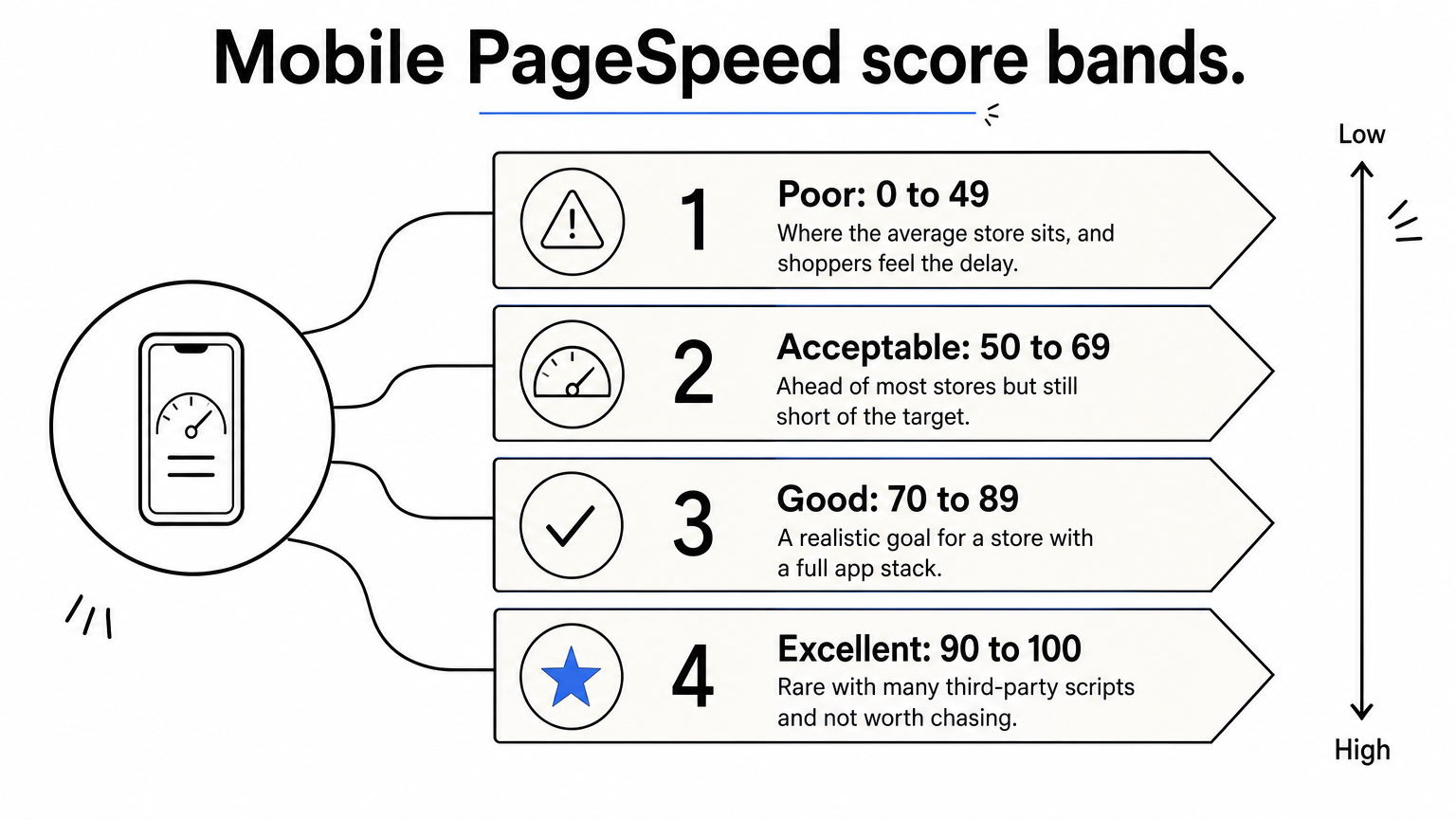
A good Shopify speed score is 70 or higher on mobile and 85 or higher on desktop, with LCP at 2.5 seconds or less. Sources disagree on the exact line. Some call 50 good and 70 awesome. A fair reading is that 50 is the floor and 70 is the target.
These bands assume a store running real apps, tracking, reviews and email widgets, which is the normal case.
| Mobile score | What it means |
|---|---|
| 0 to 49 | Poor. This is where the average store sits, and shoppers feel the delay. |
| 50 to 69 | Acceptable. You are ahead of most stores but still short of the target. |
| 70 to 89 | Good. This is a realistic goal for a store with a full app stack. |
| 90 to 100 | Excellent. It is rare with many third-party scripts and not worth chasing at the cost of features. |
Do not strip out your reviews or analytics just to hit 100. A store that scores 75 and converts well beats a bare store that scores 95 and cannot measure anything.
Say your mobile score is 45 and your LCP is 3.8 seconds. You are slightly above the reported average of 38 and 3.9 seconds, but still 25 points short of 70. Your LCP is 1.3 seconds over the 2.5-second target, so you need to cut roughly a third of your load time.
Also check the other two Core Web Vitals. Google's thresholds are an INP of 200 milliseconds or less and a CLS of 0.1 or less, judged at the 75th percentile of real visits. Passing all three matters more than any single score.
Aim for 70 on mobile and 2.5 seconds on LCP, and treat anything above the average as progress rather than success.
To beat the average, remove what slows pages down first, then automate the rest. Fixing the cause is cheaper than compensating for it.
Most slow Shopify stores share the same problems. Work through them in this order:

Change one thing at a time and retest. That way you know which fix produced which gain.
Manual work stalls when the remaining weight comes from scripts you need, such as analytics and marketing tags. This is where edge acceleration helps. Dash, the speed agent behind Nostra AI's Edge Delivery, monitors your storefront around the clock and accelerates pages from edge locations. It deploys with a DNS-level change, with no code changes or replatforming.
Across our brands, Dash has delivered up to 47% faster load times, with an expected revenue lift of about 3%. Full acceleration typically takes about two weeks. Do the manual cleanup first. Edge delivery then handles what cleanup cannot.
The average Shopify store speed is low: a mobile score near 38 and an LCP near 3.9 seconds. A good store sits at 70 or higher on mobile with an LCP of 2.5 seconds or less. Measure your own home, product and collection pages, compare them with those targets, then fix images, apps and scripts before reaching for bigger changes.
Speed is only one part of clean storefront performance. Bad bot traffic can also inflate your sessions, distort your analytics and waste ad spend, which makes your real numbers harder to read. If that sounds familiar, see how Edge Protect filters bad bots before they reach your store.


