Facebook landing page experience is how well the page behind your ad click loads, matches the ad, and works on a phone. Meta does not give it a single score. It judges it through landing page views, ad relevance diagnostics, and a review of your destination. The eight fixes below run in a sensible order. Speed and tracking suit almost every advertiser. Message match suits anyone with weak conversion. Bot filtering and QA testing suit ecommerce brands with real ad spend.
You pay for the click whether or not the page does its job. If the page takes five seconds to load on a phone, the headline contradicts the ad, or bots tap your links, you pay and get nothing back. Ads Manager then shows link clicks far above landing page views, and a cost per result that makes no sense.
This guide first explains what Meta measures. Then it walks through eight fixes, each with the same three parts: why it hurts, how to fix it, and how to check it. At Nostra AI we run edge agents for speed, bots, and QA on ecommerce storefronts, so a few fixes mention how those work. Every fix can also be done by hand.
Landing page experience on Facebook is everything a person gets between tapping your ad and being able to act: whether the page loads, matches the ad, and works on their phone. If you are asking what landing page experience is in Facebook terms, it is a bundle of signals, not a single grade. Meta reads those signals through landing page views, ad diagnostics, and ad review.
A landing page view is counted when someone clicks your ad link and your destination loads successfully, as Meta's Business Help Center describes it. A link click records only the tap. A landing page view records arrival. The gap between the two is your most direct measure of load quality.
| Metric | What it counts | What a gap tells you |
|---|---|---|
| Link clicks | Taps on the ad link | Includes people who left before the page appeared |
| Landing page views | Clicks where the page loaded | Falls when pages are slow, broken, or untracked |
| Conversions | Your chosen event, such as a purchase | Falls when the page loads but fails to persuade |
Take a worked example. You spend $1,000 and get 1,000 link clicks, but only 700 landing page views. You lost 300 visitors, or 30%, before your page showed. Your cost per link click looks like $1.00, yet your cost per landing page view is $1.43.
A link click is a promise, and a landing page view is proof that the promise was kept.
Meta looks at your page in three layers. The first is delivery. When you optimize for landing page views, Meta favors people who are more likely to click and wait for the page, so a slow page raises your costs. The second is ad diagnostics. Ads Manager shows quality ranking, engagement rate ranking, and conversion rate ranking against ads competing for the same audience, and a weak page tends to drag the conversion rate ranking down.
The third layer is ad review. Meta's advertising standards reject destinations that do not work or that deliver something different from what the ad promised. Adjusting your landing page experience on Facebook therefore means changing the page and its tracking. There is no setting to toggle.
A facebook ad with a poor landing page experience usually shows up in your numbers before anyone tells you. Use this table to match the symptom to a fix.
| Symptom in Ads Manager | Likely cause | Fix |
|---|---|---|
| Link clicks far above landing page views | Slow load, missing pixel, bot clicks | 1, 4, 5 |
| High cost per landing page view | Slow pages, weak audience fit | 1, 2 |
| Below average conversion rate ranking | Message mismatch, clumsy mobile layout | 2, 3 |
| Ad rejected over the destination | Broken page, misleading claims | 6, 7 |
| Healthy views but few purchases | Checkout bugs, low trust, wrong destination | 6, 7, 8 |
The biggest lever is load speed, because a landing page view only counts once the page loads. Every second you shave off turns more paid clicks into real visits.
Facebook traffic is mostly people scrolling on a phone, often on a mid-range device and a patchy connection. Google's research found that 53% of mobile visits are abandoned when a page takes longer than three seconds to load. Those visitors still count as paid link clicks. They just never become landing page views.
Start with the basics, then move the work to the edge.
Nostra AI's Dash agent handles the last point. It sits at the edge of your storefront, monitors speed around the clock, and accelerates pages without code changes, using a DNS-level connection. Nostra reports up to 47% faster load times, a roughly 3% expected revenue lift, and full acceleration in about two weeks.
If the page is not loaded, the ad never gets a chance to work.
Run your landing page URL through PageSpeed Insights on the mobile tab. Aim for the Core Web Vitals targets at the 75th percentile: Largest Contentful Paint under 2.5 seconds, Interaction to Next Paint under 200 milliseconds, and Cumulative Layout Shift under 0.1. Then compare your landing page views to link clicks before and after the change. The ratio should climb.
Message match means the page shows the same offer, product, and wording that the ad used. When it does not, people bounce even though the page loaded.
An ad sets an expectation in about a second. If the ad shows a blue running shoe at $89 with free shipping and the click lands on a collection of 140 shoes with no shipping note, the visitor has to start over. Most will not. Mismatch hurts conversion rate ranking and wastes the click you already paid for.
Give each ad its own matching destination. Compare these elements side by side:
| Element | Ad says | Page must show |
|---|---|---|
| Offer | 20% off, free shipping | Same offer, above the fold, no code hunt |
| Visual | Blue running shoe | Same product as the first image |
| Headline | "Lightweight daily trainer" | Same words or a close echo |
| Button | "Shop now" | A button that says the same thing |
Send ad traffic to a product page or a dedicated page, not the homepage. Apply discounts automatically through the link so the shopper never types a code. Add UTM parameters to every ad URL so you can read results by ad.
The page should feel like the second half of the same sentence the ad started.
Put the ad and the page side by side on your phone. Show both to a colleague for five seconds and ask what the offer is. If they hesitate, your visitors will too. Then open GA4 and compare engagement and bounce by campaign.
A page built for a desktop monitor often fails on a phone inside the Facebook app. Design for thumbs first, and test inside the app itself.
Links in the Facebook app typically open in Meta's in-app browser, not the shopper's usual browser. It often does not carry over logins, saved passwords, or autofill, and it exposes layout problems quickly. A pop-up that covers the screen or a button too small to tap ends the visit in seconds.
Work through this mobile checklist:
Tap your own live ad inside the Facebook and Instagram apps, not mobile Chrome. Complete the whole flow with one thumb. Then use the device toolbar in Chrome DevTools to preview small and large screens, and watch for layout jumps while the page loads.
Test the page where your shopper actually sees it, which is inside the app.
Tracking decides what Meta can count and learn from. If the pixel is missing or late, your Facebook landing page experience looks worse in the reports than it is, and Meta optimizes on bad data.
Landing page views depend on the Meta Pixel firing. A pixel that loads last, behind heavy scripts, may never fire for people who leave quickly. Browsers add to the problem. Safari, for example, shortens the life of cookies set by scripts to about a week, so returning shoppers look like strangers and your retargeting audiences shrink.
Place the Meta Pixel high in the page and fire PageView as soon as the page starts rendering, within the consent rules of your market. Add the Conversions API next to the pixel so server-side events back up browser events, and deduplicate them with a shared event ID. Track the standard events that matter for a store: ViewContent, AddToCart, InitiateCheckout, and Purchase.
Identity lifetime matters too. Nostra AI's Crumble agent extends the tracking identity from about one week to over two years and recovers lost identities, which gives Meta more matched returning shoppers to work with.
What Meta cannot see, it cannot optimize.
Open the Meta Pixel Helper extension on your landing page and confirm PageView and your key events fire once each. Use Test Events in Events Manager to confirm server events arrive and deduplicate. Finally, compare purchases in Ads Manager to real orders in your store. A large mismatch means tracking is losing data.
Bot traffic inflates link clicks, adds empty sessions, and muddies every metric you use to judge the page. Filtering it makes your real landing page experience visible.
Bots can click ad links and hit landing pages without ever behaving like shoppers. They drag down conversion rates, bloat session counts, and feed junk into your analytics and retargeting pools. You then fix the wrong problem, such as rewriting a page that is fine, because the data looks bad.
Block the traffic before it reaches your storefront. Nostra AI's Knox agent, which powers Edge Protect, blocks malicious bot traffic at the edge before it can distort analytics or waste ad spend. It lets verified crawlers such as Googlebot, ChatGPT, and Claude through. Nostra reports more than 10 billion bots blocked annually across its brands. Setup needs no code and goes live in under a day, and there is a 14-day free trial.
You can also look for signs of bot traffic by hand. Watch for clusters of sessions with zero engagement time, traffic from one region that never buys, and click spikes at odd hours.
Clean traffic turns your numbers into a fair verdict on the page.
Compare ad platform clicks to analytics sessions for the same UTM campaign. Then segment sessions by country, browser version, and engagement time. If a large share has near-zero engagement and identical browser fingerprints, you have a bot problem, not a page problem.
A page can load fine and still fail the moment someone tries to buy. Broken journeys cost sales and can put your ads at risk of review issues.
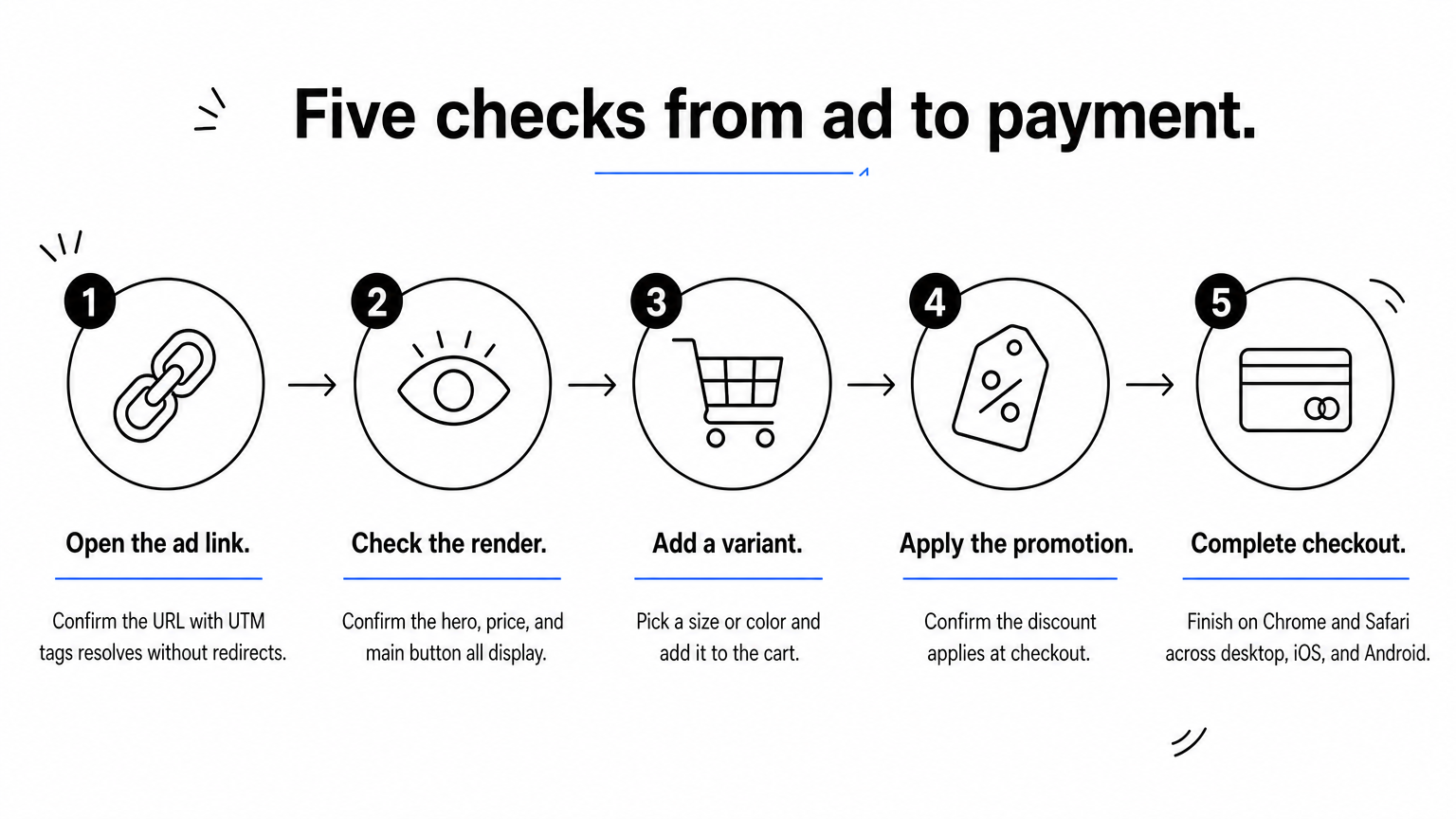
Meta counts a landing page view as soon as the page loads. It does not know that the size selector is dead on Safari or that the add-to-cart button does nothing on one Android phone. You pay for the view, the shopper hits the bug, and your conversion rate falls. Meta's standards also prohibit non-functional destinations, so a broken page can put the ad itself at risk.
Test the full path from ad to payment after every theme change, app install, or promotion launch. Use this list:
Nostra AI's Patch agent, which powers Edge Assurance, automates this. It walks the journey from homepage to checkout on real desktop and mobile devices, checks 100+ bug patterns, and files bug reports with reproduction steps and video.
A page that loads but cannot sell is still a poor landing page experience.
Place a real test order on at least one iPhone and one Android phone after each change. Track the rate of failed checkouts by device in analytics. A device with a much lower completion rate points to a bug, not a motivation problem.
A trustworthy page keeps both shoppers and Meta's reviewers comfortable. Missing basics and misleading claims create hesitation, rejections, or limited delivery.
Meta reviews the ad and the page it leads to. Pages that hide pricing, promise guaranteed results, or block content with pop-ups can see their ads disapproved or limited. Offers in health, finance, and housing draw closer scrutiny. Shoppers also judge trust within seconds, and a page with no contact details or return terms looks risky.
Run through this checklist:
Trust is a conversion feature, and it is also what ad review checks first.
Read the destination sections of Meta's Advertising Standards and compare them to your page line by line. If an ad is disapproved, open the reason in Account Quality, fix the specific issue, and request a review. Do not resubmit the same page unchanged, because that wastes time and can look like a repeat violation.
The last fix is choosing where the click lands and then proving the choice with a clean test. Different goals call for different destinations.
Sending every ad to the homepage is the most common mistake. The homepage supports many goals, so it supports none well. A lead form suits a simple sign-up but gives you less room to persuade. The wrong destination turns a good ad into a weak facebook landing page experience even when the page loads fast.
Match the destination to the goal.
| Destination | Best for | Watch out for |
|---|---|---|
| Dedicated landing page | Cold traffic, one offer | Needs building and fast hosting |
| Product or collection page | Specific products, retargeting | Navigation that pulls people away |
| Instant Experience | Full-screen mobile storytelling that leads to your site | Extra build effort, and the site still has to convert |
| Instant form | Simple lead capture inside Facebook | Less room to explain or build trust |
Plan how you change things mid-campaign. Editing the content behind an unchanged URL does not require touching the ad. A new URL means editing the ad, which triggers a fresh review and can disturb delivery, so duplicate the ad for tests. Once your page loads reliably, move your optimization goal from link clicks to landing page views, then to a conversion event once you have the volume.
Test one change at a time, or you will never know which one worked.
Use Meta's A/B test tool in Ads Manager and change a single variable, such as the destination or the headline. Give each ad set enough volume. Meta's learning phase needs roughly 50 optimization events per ad set in a week. Judge winners on conversion rate and cost per purchase, not on clicks.
Facebook landing page experience comes down to one question: does the person who clicked get a page that loads, matches the ad, and works. Start by measuring the gap between link clicks and landing page views. Then fix speed, message match, mobile layout, tracking, bots, bugs, trust, and destination, in that order, and re-measure after each change.
Of all of these, bot traffic is the one most teams miss, because it hides inside the same numbers you use to judge everything else. If you want your results to reflect real shoppers, filter bad bots at the edge with Edge Protect and let the other seven fixes show their true effect.


.svg)
