To determine the mobile ecommerce conversion rate, divide the orders placed on mobile devices by the sessions that started on mobile devices over the same period, then multiply by 100. If your store had 10,000 mobile sessions and 200 mobile orders last month, your rate is 2%. Most published benchmarks put mobile web between about 1.5% and 2.5%, so that store sits in the typical band.
The formula is simple. Getting a number you can trust is harder. Bot traffic inflates the sessions you divide by, cookies that expire after a week split one shopper into several visitors, and a phone visit that ends in a laptop purchase counts as a miss. A rate built on those inputs makes your store look worse than it performs.
This article explains why mobile deserves its own rate, walks through the calculation step by step, shows what skews the result, and gives you benchmarks to compare against. Nostra AI works on the inputs behind this number, including page speed, bot filtering and customer identity at the edge of ecommerce storefronts. So we also cover what to change when your rate falls short.
A blended conversion rate hides the device that brings in much of your traffic and converts the least. Tracking mobile separately shows you where the biggest gap in your store sits and how much money it is worth.
Take a store with 100,000 monthly sessions. If 70,000 are mobile and convert at 2.0%, that is 1,400 orders. The 30,000 desktop sessions convert at 4.0% and add 1,200 orders. The store reports 2,600 orders on 100,000 sessions, a blended 2.6%, which looks healthy.
The mobile number tells a different story. Lifting mobile from 2.0% to 2.5% adds 350 orders a month. At an average order value of $80, that is $28,000 in extra monthly revenue from traffic you already pay for. The blended figure would have moved only from 2.6% to 2.95%, and no one would have asked why.
A blended rate tells you the store is fine. The mobile rate tells you where the money is.
Mobile shoppers behave differently, and not every cause of the mobile-to-desktop conversion gap is fixable on your site. Knowing which is which keeps you from chasing the wrong problem.
Divide mobile orders by mobile sessions for the same date range, then multiply by 100. Use the same filter on both numbers, or the result means nothing.
Copy this formula for calculating ecommerce conversion rate and keep it next to your reporting:
Mobile conversion rate = (mobile orders / mobile sessions) x 100
Suppose last month your analytics shows 48,000 sessions with a device category of mobile and 960 completed orders from those sessions. Divide 960 by 48,000 to get 0.02, which is a 2.0% mobile conversion rate. Run the same math on desktop and tablet and you have the full device picture.
Follow these steps each month:
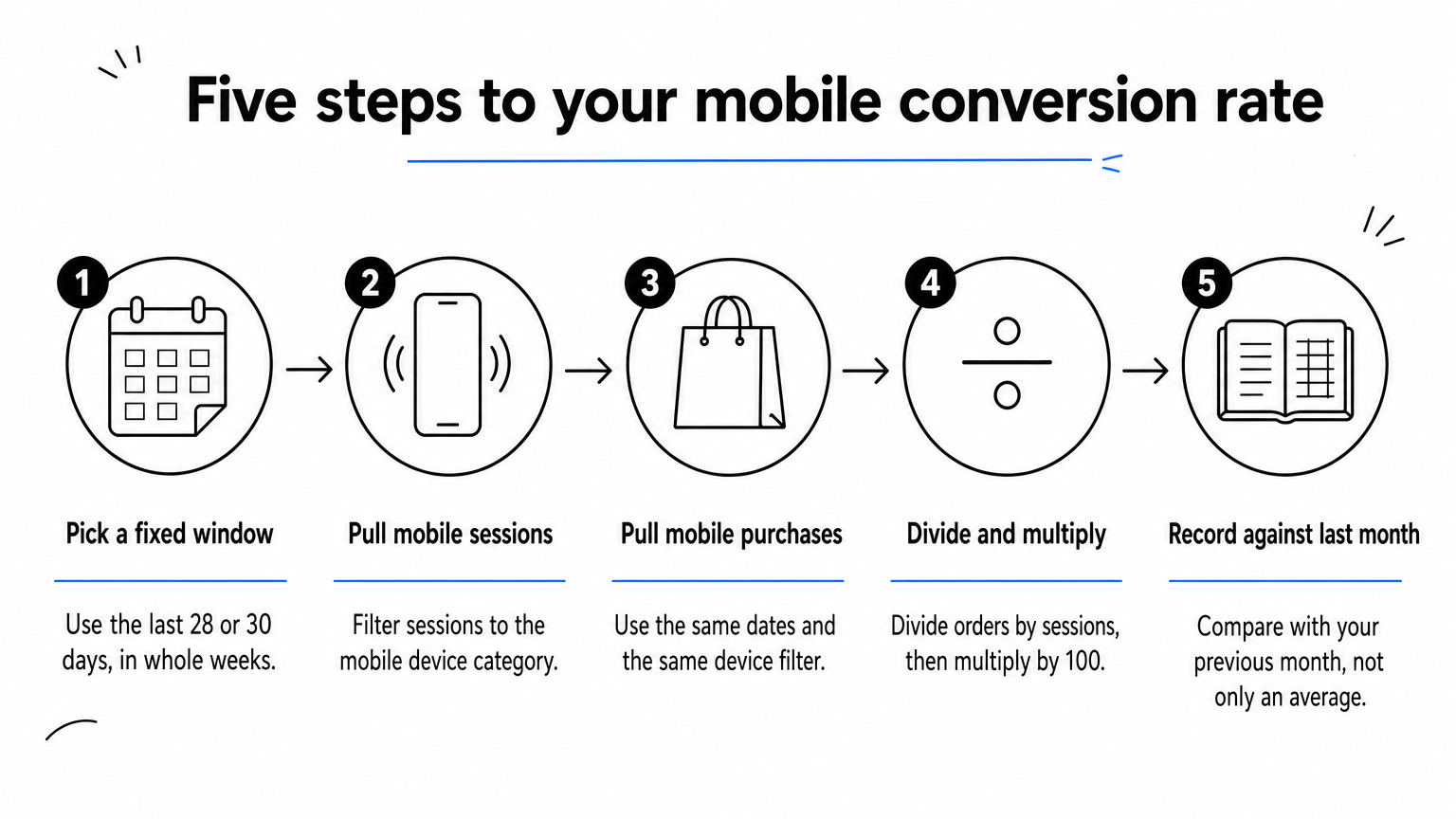
In GA4, a free-form exploration with device category as the dimension and sessions and ecommerce purchases as metrics gives you both numbers for your ecommerce conversion rate in Google Analytics. Shopify's analytics also breaks conversion rate down by device type, which is a quick cross-check. If the two tools disagree by more than a few percent, find out why before you trust either one.
A single rate has no address. Once you have it, split the mobile funnel into product views, add to cart, checkout start, and order. If 100 mobile shoppers reach a product page and only 6 add to cart, the product page is your problem, not the checkout. Compare each stage rate against the same stage last month, and fix the step that loses the most people in absolute numbers.
The formula takes one minute. Trusting the inputs is the real work.
Four choices move your rate without changing how well the store sells: whether bots are filtered, how you count returning shoppers, which devices count as mobile, and whether the app is included. Settle each one before you compare months.
Every automated session on your mobile traffic adds to the sessions you divide by and never buys anything. Suppose 6,000 of the 48,000 sessions above were bots. The real rate is 960 divided by 42,000, or 2.29%, not 2.0%. You were underselling your store by almost 0.3 points.

The distortion also hits ad decisions, because inflated sessions make channels look worse than they are. Filtering at the edge, as Nostra's Knox agent does, removes malicious bots before they reach your analytics. It still lets verified crawlers such as Googlebot, ChatGPT and Claude through.
Session-based rates penalize long consideration. A shopper who visits three times on a phone and buys once converts at 33% by sessions and 100% by people. Cross-device buying adds to it: the phone visit counts as a failure and the laptop visit as a win.
Short-lived cookies make it worse, because a returning shopper looks like a new visitor after the cookie expires. Nostra's Crumble agent extends first-party cookie life from about a week to over two years, so a repeat visitor stays one person in GA4, Meta and Klaviyo.
Keep these rules fixed so your trend stays comparable:
Filter the bots, count people, and fix your definitions before you compare any two numbers.
Mobile web usually converts between 1.5% and 2.5%, and a rate above 2.5% is strong. Tablets and desktops convert higher in most data sets.
| Device | Typical conversion rate |
|---|---|
| Mobile web | 1.5% to 2.5% |
| Tablet | 2.5% to 3.5% |
| Desktop | 3.5% to 4.5% |

Not every source agrees. Some twelve-month retail data sets put mobile near 2.9%, ahead of desktop at about 2.2%, usually where shoppers are mobile-first. Treat the table as a band rather than a verdict, because the traffic mix behind each published figure differs from yours.
So is 2.5% a good mobile conversion rate? Yes. It sits at the top of the typical mobile range. It would be only average as a site-wide rate, since global ecommerce averages run roughly 2.5% to 3.0%. A common sign of a healthy store is a mobile rate at about 45% to 55% of its desktop rate. If mobile converts at less than a third of desktop, something on mobile is broken.
Category sets the ceiling before design does. These are approximate all-device conversion rates by vertical, so expect mobile to land below them in most categories.
| Category | Approximate all-device rate |
|---|---|
| Beauty and personal care | 5.4% |
| Food and beverage | 4.5% |
| Fashion and apparel | 2.7% |
| Home and furniture | 1.2% |
| Luxury and jewelry | 0.7% |
A luxury watch store at 0.8% on mobile is in line with its category, while a beauty store at 2% on mobile has room to grow. Use your own previous month as the most reliable comparison, filtered to the same device and traffic source.
Judge your rate against your category, your device mix and last month, in that order.
Start with the inputs you can fix without a redesign: page speed, bugs, and bad traffic. Then work the funnel stage that loses the most shoppers.
Slow pages cost mobile shoppers before they see a product. Nostra's Dash agent accelerates pages at the edge and reports up to 47% faster load times and an expected revenue lift of around 3%, reaching full acceleration in about two weeks. Bugs matter just as much. Patch walks the journey from homepage to checkout on real iOS and Android devices and files bug reports with reproduction steps and video, so a broken mobile checkout does not sit unnoticed for weeks.
Once the inputs are clean, use your stage rates to find the biggest absolute loss. For most mobile stores that is the step from product page to cart or the checkout itself. Allow guest checkout, cut form fields, offer express payment methods like Apple Pay, Google Pay or PayPal, and show shipping costs early. Change one thing at a time and measure it against the same mobile segment, so you know what worked.
Fix what feeds the rate before you redesign what produces it.
To determine your mobile ecommerce conversion rate, divide mobile orders by mobile sessions, multiply by 100, and compare the result with your own history first and the 1.5% to 2.5% mobile band second. Clean inputs make that comparison honest. Filter the bots, count people rather than sessions, and keep your device definitions fixed.
If your result looks low, check the denominator before you blame the design. Automated sessions are the most common reason a healthy store reports a weak mobile rate. See how Edge Protect removes automated sessions before they reach your analytics and get a mobile conversion rate you can act on.


.svg)
