
If you manage an ecommerce storefront, you've probably noticed INP Core Web Vitals showing up in your Google Search Console reports where First Input Delay used to live. That switch happened in March 2024, and it caught a lot of teams off guard because INP measures something different: not just how fast your site reacts to the first click, but how responsive it stays through every tap, scroll, and add-to-cart button press during a visit.
So what is INP in Core Web Vitals, exactly? It's a Google metric that tracks the worst-case delay between a user interaction and the next visual update on screen, scored across the entire session rather than a single moment. Anything under 200 milliseconds passes, anything over 500 fails, and checkout flows heavy with JavaScript tend to be the worst offenders.
This article breaks down how INP is measured, what a passing INP core web vitals test actually looks like in real tools, and the specific fixes that move the needle: trimming main-thread work, deferring third-party scripts, and optimizing event handlers. We'll also cover why storefronts running edge-based site speed optimization see faster wins than those relying on code changes alone.
Growth teams tend to treat the full set of Core Web Vitals as an SEO checkbox, something you fix once and forget. That mindset misses what INP actually measures: whether your storefront feels broken to a real shopper. When someone taps "add to cart" and the button doesn't visibly respond for half a second, they tap again, or they leave. Multiply that hesitation across thousands of sessions a day and you get abandoned carts that never show up in a bug report, because nothing technically crashed. The page just felt slow at the exact moment money was on the line.

Responsiveness problems concentrate at your highest-value moments: product filtering, size selectors, add-to-cart clicks, and checkout form fields. These are all interaction-heavy, JavaScript-dependent elements, which is exactly where INP scores tend to spike. Data from Google's own research shows a clear correlation between poor INP and higher bounce rates on ecommerce pages, and internally, brands running on Nostra AI have seen faster pages lift conversion rate and average order value alongside faster interaction times once main-thread bottlenecks get resolved at the edge.
A slow click at checkout doesn't just cost a page view. It costs a sale.
Most teams calculate customer acquisition cost without factoring in what happens after the click. If you're paying $40 to acquire a visitor through paid search or Meta ads and your storefront delivers a laggy, unresponsive experience once they land, you're burning that spend on a session that never converts. This is a genuine drag on your marketing math, not a hypothetical one. Poor INP scores tend to correlate with product detail pages and cart drawers, the pages your ad campaigns push traffic to directly.
Google folded INP into its page experience ranking factors the same way it did with FID before it, meaning your INP core web vitals score can influence where you land in organic search results, particularly for competitive product and category page terms. Below is a quick view of how the three thresholds map to what shoppers actually experience:
| INP Score | Rating | What the shopper feels |
|---|---|---|
| Under 200ms | Good | Taps and clicks feel instant |
| 200-500ms | Needs Improvement | Noticeable lag, some hesitation to re-tap |
| Over 500ms | Poor | Feels broken, users abandon or rage-click |
Ranking impact aside, a storefront that consistently lands in the "Poor" bucket is telling Google, and your customers, the same thing: this site struggles under real interaction load.
Unlike a blog or news site, ecommerce storefronts are interaction-dense by design. Every product page has filters, image galleries, size pickers, and quantity steppers, and every one of those elements can trigger a slow interaction if the underlying JavaScript is bloated or poorly sequenced. Add in third-party scripts for reviews, personalization, and analytics, and you've got dozens of scripts competing for the same main thread every time a shopper taps something. That's why ecommerce sites tend to post worse INP scores than the average website, and why fixing it usually needs a site speed optimization approach that works at the delivery layer rather than a single code patch buried in your theme.
Brands running Dash, the edge agent that keeps every page responsive, address this at the edge, monitoring real interaction data across the storefront and intervening before slow scripts ever reach the browser. That matters because INP isn't a metric you fix once. It shifts every time you add a new app, a new pixel, or a new promotional widget, so the teams that stay ahead treat it as an ongoing job, not a one-time audit.
Running an accurate INP core web vitals test means understanding two very different data sources: field data and lab data, one collected from real shoppers and one generated in a controlled environment. Field data comes from the Chrome User Experience Report (CrUX), which aggregates anonymized interaction timings from actual Chrome users visiting your storefront. Lab data comes from tools that simulate a session on your machine, which is useful for debugging but won't always match what shoppers experience on a mid-range Android phone with a spotty connection.
Google's own PageSpeed Insights tool is the fastest way to check both at once. Paste in a product page URL and you'll get a field-based INP score if your site has enough traffic to appear in CrUX, plus lab-based diagnostics flagging which scripts are blocking the main thread. Search Console's Core Web Vitals report goes a step further, grouping URLs by INP status across your entire domain, so you can spot whether the problem is isolated to checkout or spread across every category page, and what to do when your Core Web Vitals assessment fails.
If your INP score only comes from lab tests, you're measuring a simulation, not your actual shoppers.
A one-time test tells you almost nothing about how INP behaves under real shopping conditions, since scores shift with device type, network speed, and whatever third-party scripts happen to be loading that day. Chrome DevTools' Performance panel lets you record an actual interaction, like clicking a size selector, and see exactly which JavaScript task caused the delay. The web-vitals JavaScript library, maintained by Google, can be dropped into your site to log real INP data straight from your own analytics, giving you a continuous feed instead of a single grade.
Segmenting matters more than most teams realize. A homepage might post a great INP score while your cart drawer sits in the "poor" bracket, and averaging the two hides the real problem.
Once you know which pages and interactions are dragging your score down, you're ready to fix the underlying causes rather than chase the number itself.
Fixing INP starts with the same principle every time: reduce main-thread work during the moments users actually interact with the page. Long JavaScript tasks block the browser from responding to taps and clicks, so the goal is breaking those tasks into smaller chunks the browser can interrupt when a shopper does something. This is the actual mechanism behind every INP fix, whether you're touching code directly or letting an edge agent handle it for you.
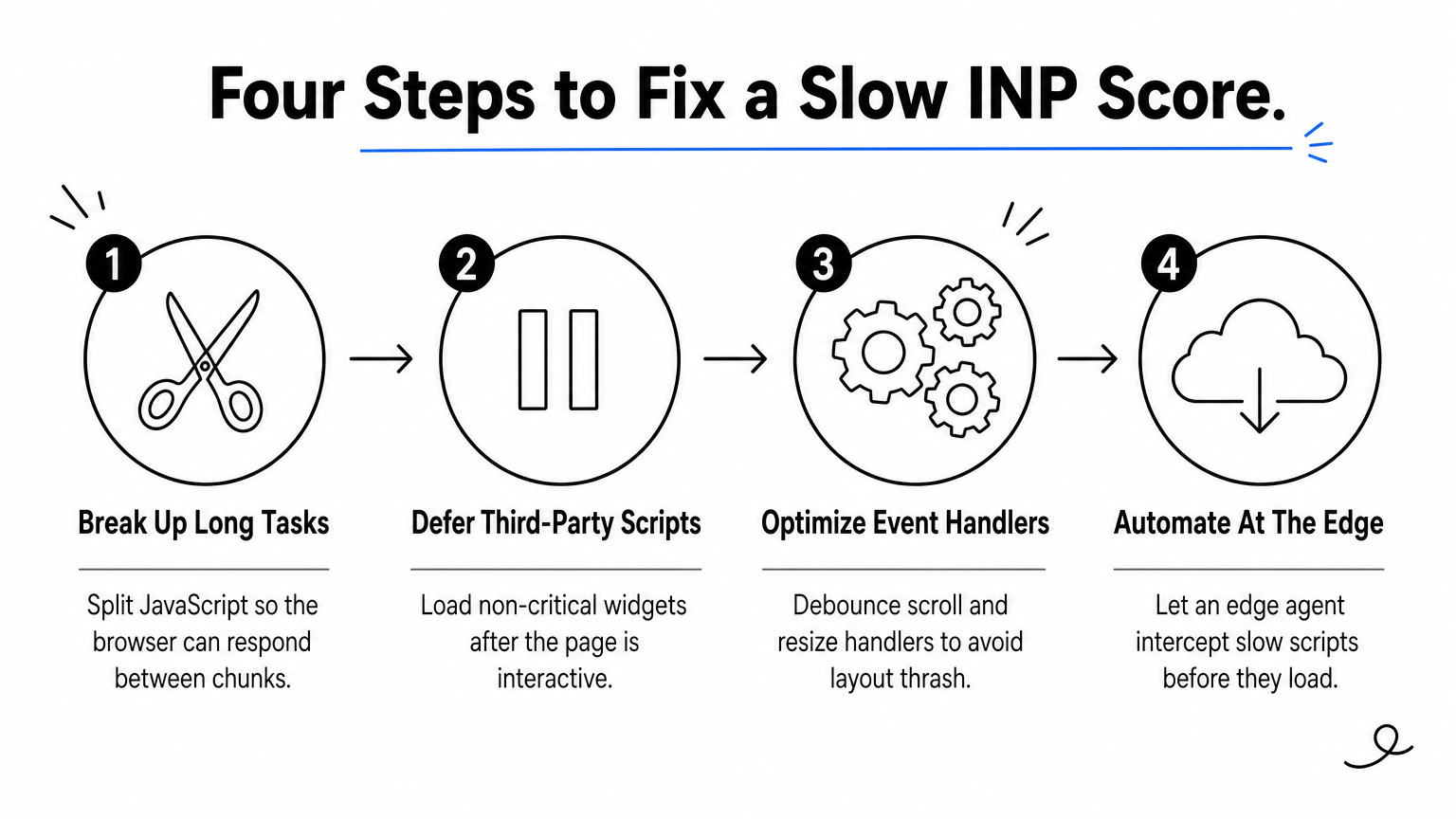
Browsers can't paint an update while a single JavaScript task is still running, so any task over 50 milliseconds risks delaying the next interaction. Splitting a large task with setTimeout or the newer scheduler.yield() API lets the browser check for pending clicks between chunks:
async function processCartUpdate(items) {
  for (const item of items) {
    updateLineItem(item);
    await scheduler.yield(); // hands control back to the browser
  }
}
This single change often takes a laggy add-to-cart button from a 600ms delay down to something well under the 200ms threshold.
Review widgets, personalization pixels, and chat plugins are frequent INP culprits because they load and execute without regard for what the shopper is doing at that moment. Load anything non-critical with defer or async, and remove scripts that duplicate functionality you already have. If you're not sure which script is the actual offender, Chrome DevTools' Performance panel will name it directly, showing you the exact function call eating up the interaction delay.
The fastest INP fix isn't writing new code. It's removing the code that shouldn't be running yet.
Event handlers that trigger layout recalculations, like resizing an image gallery on every scroll tick, are another common source of slow interactions. Debouncing these handlers, and moving non-visual work off the main thread with Web Workers, keeps the browser free to paint the next frame quickly.
Manually auditing every script across a large product catalog isn't realistic for most teams, especially once you're running dozens of apps and marketing pixels. Nostra AI's Dash agent automates this speed optimization work at the edge, identifying which scripts are dragging down interaction times and intervening before they reach the shopper's browser, without touching your theme code or waiting on an engineering sprint. Brands using Dash have seen load times improve by up to 47%, which shows up directly in INP scores across product and checkout pages.
First Input Delay measured a single moment: the gap between a shopper's first tap and the browser's response to that one interaction. INP core web vitals scoring works completely differently. It tracks every interaction across the full session and reports the worst delay, meaning one bad moment late in checkout can tank your score even if the first click on your homepage was instant. That shift alone explains why so many sites saw their Web Vitals report change overnight in March 2024, sometimes for the better, often for the worse.
Under FID, a site could pass easily by responding fast to that first tap, then bog down completely once a shopper started filtering products or filling out a shipping form. FID never caught that, because it only cared about the opening interaction. INP closes that gap by scoring input delay, processing time, and rendering time for every click, tap, and keypress, then surfacing the worst one. That's a much harder bar to clear, and it's why plenty of storefronts that passed FID for years suddenly show up in Search Console flagged for poor core web vitals inp performance.
FID told you the front door opened fast. INP tells you if the whole store stays responsive once shoppers are inside.
| Factor | FID (retired) | INP (current) |
|---|---|---|
| What it measures | First interaction only | Every interaction, worst-case reported |
| Includes rendering time | No | Yes |
| Passing threshold | Under 100ms | Under 200ms |
| Catches checkout-flow lag | Rarely | Consistently |
| Retired | March 2024 | Active metric |
Given this table, it's clear the newer metric demands a broader fix, not a narrower one.
Historically, teams optimizing for FID could get away with fixing whatever ran on page load and calling it done. Ignoring that same approach under INP leaves you exposed, since a fast-loading page can still fail INP badly if its cart drawer or size selector lags on the tenth interaction of a session. Just as important, INP forces you to think about JavaScript execution across the entire customer journey, from landing page to order confirmation, rather than the first three seconds. Kept in mind, that's the real reason INP feels harder to pass: it's not a stricter version of the same test, it's a different, more honest test of whether your storefront actually works under real shopping behavior.
Most storefronts land in the "poor" bracket of an INP core web vitals test for the same handful of reasons, and none of them require exotic code to explain. Third-party app sprawl and unmanaged DOM size account for the bulk of slow interactions on product and checkout pages, and both tend to creep in gradually as marketing teams add tools without anyone auditing the cumulative weight.

Shopify and BigCommerce make it easy to install a review widget, a loyalty app, a live chat plugin, and an upsell tool in an afternoon, and each installed app drops its own JavaScript bundle onto every page whether a shopper interacts with it or not. Every added app competes for the same main thread, so a size selector that used to respond instantly starts lagging once five or six apps are running scripts in the background. Auditing your app list quarterly and removing anything with overlapping functionality is one of the fastest wins available, and it costs nothing but engineering time.
Image carousels, filter panels, and infinite-scroll category pages often ship with heavy JavaScript libraries built for flexibility rather than speed, so stripping out the JavaScript your pages never execute matters when a product page with hundreds of DOM nodes forces the browser to recalculate layout on every tap. Lazy-loading images helps, but lazy-loading done poorly, where the browser still has to parse a bloated script before deciding what to defer, can make interaction responsiveness worse instead of better.
A storefront can load fast and still feel slow, because INP measures what happens after the page appears, not before.
Bad bots don't show up in your CrUX field data since Google only counts real Chrome sessions, but they still hammer your origin server with requests, and that extra load costs you speed and conversions for the real shoppers browsing at the same time. Nostra AI's Knox agent blocks malicious bot traffic at the edge before it ever reaches your storefront, which keeps server resources free for the interactions that actually count toward your score.
Getting your INP core web vitals score into the "good" range isn't a one-time project. It's an ongoing discipline, because every new app, pixel, or promotional widget you install can quietly push interaction delays back into the "poor" bucket. Passing your INP core web vitals test today doesn't guarantee you'll pass it after next quarter's marketing tool rollout, which is exactly why manual audits alone struggle to keep pace.
Real shoppers don't care whether your homepage loads fast if the size selector lags on the tenth tap of their session. They just leave, and that abandoned cart never shows up as a bug report. Treating responsiveness as infrastructure, not a checklist, is what separates storefronts that stay fast from the ones that slip every time a new script gets added.
If you'd rather have this handled automatically at the edge instead of chasing scripts manually, see how Nostra makes your site impossibly fast without touching your codebase.


.svg)
