A low conversion rate in ecommerce is anything well below the 2% to 4% that most published benchmarks cite as average, and under 1% almost always deserves a closer look. But the number alone tells you little. Before you change anything, confirm that your sessions are real people, then find the first funnel stage that leaks. Stores buying a lot of paid traffic should start with causes 1 and 2. Stores with healthy traffic and weak carts should start with causes 5 to 7. Stores that convert fine on desktop and badly on phones should jump to causes 3, 4 and 9.
The frustrating part is that a low rate gives you no address. Conversion rate is orders divided by sessions, so it drops when the wrong visitors arrive, when shoppers hit friction, when something breaks, or when your analytics count traffic that was never human. Most guides skip that last one, and it is often the cheapest to fix.
This guide works in funnel order. You get benchmarks to compare against, a diagnosis routine, then ten causes. Each one covers what it looks like, why it costs you sales, and how to fix it. Nostra AI runs speed, bot protection, identity tracking and QA agents at the edge for 300+ ecommerce brands, so several of these causes come from watching real storefronts.
For most online stores, a sitewide conversion rate under 2% is below average, and under 1% points to a real problem. Category, device and traffic mix all move the line, so use the benchmarks below as a starting point, not a verdict.
Published benchmarks by industry cluster between 2% and 4% across verticals. Expensive, considered categories such as consumer electronics sit lower, often under 1.5%. Mobile converts below desktop at most stores, and first-time visitors convert below returning ones. Compare yourself to your own category and your own history before you compare yourself to an industry average.
| Sitewide rate (orders ÷ sessions) | How to read it |
|---|---|
| Under 1% | Likely a real problem: traffic quality, speed, or a broken step |
| 1% to 2% | Below average. Gains usually sit in one or two funnel stages |
| 2% to 4% | The typical range for most stores |
| Above 4% | Strong. Often niche products, a loyal audience, or high-intent traffic |
| Above 10% | Check your tracking. You are probably measuring a segment or counting something other than orders |
A low conversion rate means there is a gap between the visitors you attract and the orders you get. It does not say where the gap is. Three explanations cover almost every case: the wrong visitors arrived, the right visitors hit friction, or the number itself is wrong.
A low conversion rate is a symptom, and your first job is to find out whether the cause is traffic, friction or measurement.
That also answers the question of whether a 12% rate is good. For a whole store, it would be extraordinary, which is exactly why you should doubt it. Teams who see 12% are usually looking at add-to-cart rate, a single email flow, or a tracking error.
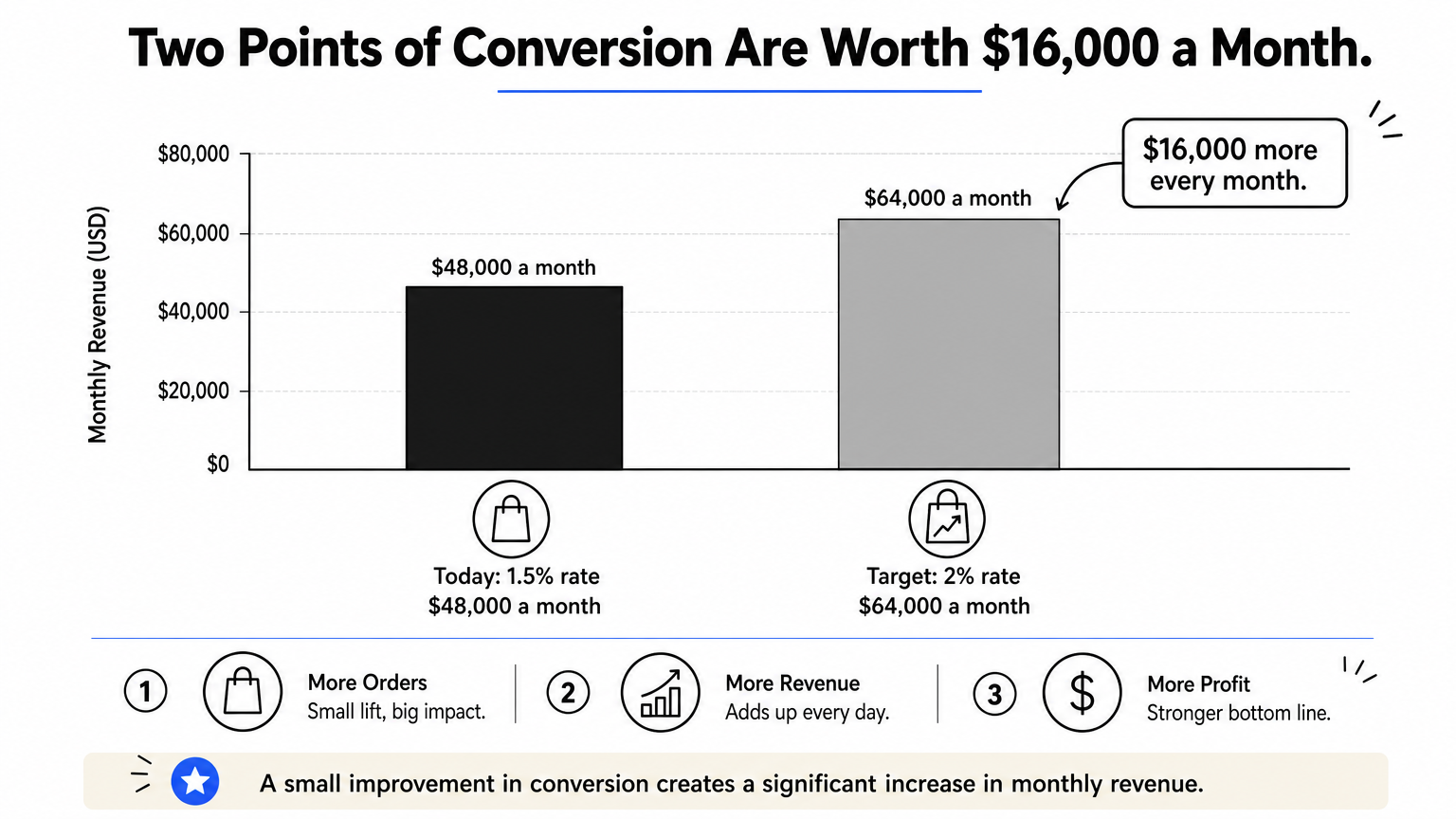
Take a store with 40,000 sessions a month, 600 orders and an average order value of $80. That is a 1.5% rate and $48,000 in monthly revenue. Lift the rate to 2% on the same traffic and you get 800 orders and $64,000. That is $16,000 more every month without a dollar of extra ad spend, and it is the reason to fix conversion before you buy more traffic.
Diagnose in three passes: check that the data is right, find the first funnel stage that leaks, then segment to see who is affected. Skipping to fixes before these passes is how teams spend a quarter redesigning a checkout that was never the problem.
Compare the same date range in your store admin, GA4 and your ad platforms. If admin orders are steady but GA4 purchases fell, you have a tracking problem, and these often follow a theme or app update. If orders are steady but sessions jumped, suspect bots before you suspect your site. Fix measurement first, then re-read the rate.
Compare the current period to the previous one for each stage below, and look for the first meaningful drop, not the biggest. A leak early in the funnel starves every later stage, so later numbers look guilty when they are not.
| Funnel stage | Metric to compare | A drop points to cause |
|---|---|---|
| Arrival | Engaged session rate by source | 1, 2, 3 |
| Browsing | Product view rate | 3, 4, 5 |
| Product page | Add-to-cart rate | 4, 6 |
| Cart | Checkout start rate | 7 |
| Checkout | Purchase completion rate | 8, 9 |
| Return visits | Returning visitor conversion and attribution | 10 |
A blended average hides the story. Split the rate by device, browser, traffic source, new versus returning visitors, and landing page. Then read the timing. A sudden drop almost always follows a change in the prior two weeks: a theme edit, a new app or script, a price or shipping change, a new campaign. A slow slide usually means your traffic mix shifted or competitors got better.
Segment first, because one weak segment can pull a healthy store's average below 2%.
Bot traffic is the most overlooked cause of a low conversion rate in ecommerce, because it lowers the metric without touching a single real shopper. If your sessions jumped and your orders did not, check here before you redesign anything.
Sessions climb while orders stay flat, so the rate sinks with no change on the site. Bot sessions often arrive as one-page visits with no scrolling, clustered in one country, city or hosting provider, landing on odd URLs such as search results or cart endpoints. Check these in GA4:
Conversion rate is orders divided by sessions, and bots only add to the bottom number. Go back to the store with 40,000 sessions and 600 orders. If 12,000 of those sessions are bots, you report 1.5%, but real shoppers convert at 2.1% (600 divided by 28,000). You would chase fixes for a problem smaller than it looks.
The damage goes beyond the metric. Bots click paid ads, drain ad budget, pollute retargeting audiences and corrupt A/B tests, because variants split traffic that never meant to buy. GA4 excludes known bots and spiders automatically, but newer scrapers and AI-driven bots often get through.
Bots never buy, so every bot session lowers your conversion rate and hides the real one.
Filtering reports after the fact helps, but stopping bots before they load a page is cleaner.
Knox, the bot agent behind Nostra's Edge Protect, does this at the edge. It blocks malicious bots before they distort analytics or waste ad spend, while letting Googlebot, ChatGPT and Claude through. Setup is live in under a day with no code, and there is a 14-day free trial. Once the traffic is clean, recalculate your rate and use that as your new baseline.
Traffic quality can sink conversion even when your site is excellent. If one channel brings most of your sessions and almost none of your orders, you have a targeting or message-match problem, not a store problem.
Your blended rate sits low, but one source converts well. For example, email at 4% and broad paid social at 0.4%. Paid landing pages show high bounce and shallow scroll. Ads promise one thing, such as a specific product or a discount, and the landing page shows something else, usually the homepage.
Your sitewide rate is an average of audiences with very different intent. Broad interest targeting and discount-led creative attract curious browsers and deal hunters who rarely buy at full price. Each of them adds a session and no order.
Message mismatch does the rest. A shopper who clicked an ad for a specific jacket and lands on a generic collection has to start over. Many do not bother. They were ready to buy, and your routing let them down.
A blended conversion rate averages visitors who wanted to buy with visitors who never did.
Then move budget toward the sources that convert. A channel that sends 30% of your traffic and 5% of your orders is not a conversion problem to fix on-site. It is a spending decision to revisit.
Slow pages lose shoppers before they have formed an opinion about your products. Speed rarely appears on a list of conversion fixes, but it affects every stage of the funnel and every device.
Bounce rate is high on mobile, product view rate is weak, and PageSpeed Insights shows red in the field data. Google's Core Web Vitals give clear targets, measured at the 75th percentile of real visits:
Google explains these thresholds in its Core Web Vitals documentation. Check your field data, not only the lab score, because field data reflects the phones and networks your shoppers really use.
Shoppers on a slow page leave before the hero image appears, and they do not report why. The usual culprits are heavy images, a pile of third-party scripts from apps, tag managers and review widgets, and unoptimized JavaScript that blocks the page from becoming usable.
Slow pages also hurt layout stability. When a banner pushes the add-to-cart button down at the moment someone taps, they hit the wrong thing or give up. Speed problems tend to grow as stores add apps, so a store that was fast at launch can be slow two years later without any single bad decision.
Every app and script you add buys a feature and costs you load time, so audit them like you audit ad spend.
Dash, the speed agent behind Nostra's Edge Delivery, accelerates pages at the edge and monitors speed around the clock. Nostra reports up to 47% faster load times and an expected revenue lift of about 3%, with full acceleration in about two weeks and no code changes.
Mobile shoppers are the largest share of traffic for many stores, and they convert at a lower rate than desktop almost everywhere. A gap is normal. A huge gap means your phone experience is the problem.
Desktop converts near the average, phone converts at less than half of it, and mobile accounts for most of your sessions. Session recordings show shoppers tapping the wrong element, zooming in, or scrolling back to find the buy button. Mobile checkout completion trails desktop checkout completion by a wide margin.
Phone screens leave little room for mistakes. Small tap targets, a sticky header that eats a quarter of the viewport, a popup that cannot be closed with a thumb, or an add-to-cart button below three screens of copy all cost orders. Typing card and address details on a phone is slow, so every extra field costs more than it does on desktop.
Teams also design and test on large monitors. A layout that looks clean at 1440 pixels can be broken at 390. Do not judge your mobile rate against your desktop rate. Judge it against your own mobile history and against a clear checklist of mobile friction.
Test your store on a real phone with one hand, because that is how most of your shoppers use it.
Discovery is the hidden stage between landing and viewing a product. If shoppers cannot find something they would happily buy within a few clicks, no product page can save the sale.
Product view rate is low, category pages have high exit rates, and shoppers who use search convert no better, or worse, than those who browse. Your search report shows zero-result queries for products you actually stock. Navigation uses internal jargon instead of the words customers use.
Shoppers will not work to give you money. Weak internal search, vague category names, thin filters and a menu with ten or more top-level items all add effort. A shopper who types "sweatshirt" when you call it a "crewneck pullover" sees a blank page and leaves.
Large catalogs add another problem. When everything is available and nothing is highlighted, many visitors choose nothing. A rough 80/20 pattern holds in many stores: a minority of products produces most of the revenue. If your best sellers are buried on page four, you are hiding the products most likely to convert.
If shoppers cannot find a product in a few clicks, your catalog size is working against you.
Product pages are where most browsing intent is won or lost. When add-to-cart rate is low and product views are healthy, the page is not answering the questions shoppers have.
Many views, few add-to-carts, and support inbox messages asking the same things: does it fit, what is it made of, when does it arrive, can I return it. Pages vary widely in quality. Some have six photos and detailed specs, others have one photo and two lines of copy. Reviews, where they exist, are buried or unsorted.
Online shoppers cannot touch the product, so the page has to replace the touch. Generic copy such as "premium quality" and "perfect for everyday use" applies to everything and convinces no one. Missing size guides, a single photo and no scale reference leave shoppers guessing, and guessing is a reason to leave.
Trust matters as much as information. Reviews that mention fit, durability or results answer questions better than any copy you write. Shipping and return terms hidden in the footer remove the safety net at the moment shoppers need it.
A product page works when a skeptical shopper can answer every question without leaving it.
If shoppers add products to the cart but do not start checkout, cost is the first thing to examine. Decisions to buy are made on the product page. Decisions to leave are often made when the total changes.
Add-to-cart rate is fine, but checkout start rate is weak, and many carts end at the shipping step. Exit surveys, if you run them, mention shipping cost or delivery time. Your return policy lives in the footer, written in legal language, and differs by product category.
Checkout research repeatedly ranks unexpected extra costs as the top reason shoppers abandon. Shoppers are not always unwilling to pay for shipping. They are unwilling to be surprised by it after deciding to buy. Vague delivery windows such as "5 to 10 business days" shift the uncertainty onto the shopper, and a restrictive or unclear return policy raises the perceived risk of buying at all.
Shoppers will accept a cost they saw early, and they will abandon one they discovered late.
Check the margin first. Free shipping that loses money on every order is not a conversion fix.
By the time a shopper starts checkout, they have decided to buy. Your only job is to stay out of the way, and every extra step or field costs your most committed visitors.
Checkout start rate is solid and purchase completion is weak. Drop-off clusters on one step, often the account or payment step. Mobile completion lags desktop. Competitors you buy from yourself have shorter forms.
Checkouts collect clutter over time: a marketing field added here, a mandatory account there. A forced account creation step stops guests who just want to buy once. Long address forms, missing validation and unexplained errors turn a two-minute task into a ten-minute chore.
Missing payment methods quietly cost sales too. A shopper who prefers Apple Pay or PayPal and sees only a card form often closes the tab without an error. You never learn how many you lost, which is why it lasts.
The checkout is the last place to ask shoppers for anything you do not need to ship the order.
Bugs are the cause teams least expect and the one with the steepest penalty. A broken button on one browser means zero conversion for everyone on that browser.
Conversion varies sharply by browser, operating system or device, for example iOS Safari far below desktop Chrome after a release. A drop starts a few days after a theme edit or app update. Support tickets mention a button that did nothing, a promo code that cleared the cart, or a page that froze. Analytics shows no error, only a lost sale.
Most bugs never show an error to the shopper or the store. The page looks fine, the button just does not respond, and the shopper leaves. Teams usually test on desktop Chrome and stop. Meanwhile apps, scripts and themes update on their own schedules, and each update can break a path on Safari or on a specific phone.
Bugs hit your best visitors hardest, because they only matter once someone tries to act. The shopper who reached the pay button is the one you lost.
A bug on checkout costs you a hundred percent of the shoppers who meet it.
Patch, the QA agent behind Nostra's Edge Assurance, automates this. It walks the full customer journey from homepage to checkout on real desktop and mobile devices, checks 100+ bug patterns, and files reports with reproduction steps and video before shoppers hit the problem.
Many purchases take more than one visit. When your tracking forgets shoppers between visits, your ads, emails and reports all work from bad information, and your conversion rate and channel decisions suffer.
A high share of visitors shows as new, even though many have been before. Retargeting audiences are small, abandoned cart flows reach fewer people than expected, and attribution reports credit direct traffic for orders that your ads started. Shoppers who visit twice over two weeks look like two different people.
Safari caps cookies written by JavaScript at seven days, and other browsers apply similar limits. A shopper who researches for ten days and returns is counted as someone new. Meta, Google, Klaviyo and GA4 lose the link to their earlier browsing, so retargeting misses them, cart reminders do not trigger, and the ad that started the journey gets no credit.
That distorts decisions as well as results. When attribution is incomplete, you cut channels that work and fund channels that only capture the last click. Your recognized conversion rate looks lower because you cannot connect the first visit to the order.
If your tracking forgets shoppers after a week, you are optimizing against an incomplete picture of how they buy.
Crumble, the cookie agent behind Nostra's Edge ID, extends cookie life from 7 days to up to 2 years as first-party cookies and recovers lost identities automatically. It works with Meta, Google, Klaviyo and GA4, goes live in a day with no code, and reports 99% of visitors recognized after 28 days.
Start with the cause you can verify in an afternoon. Confirm your tracking, remove bot sessions, then find the first funnel stage that leaks and work down. Traffic problems come before page problems, and page problems come before checkout problems, because an early leak starves every stage after it. The earlier you fix measurement, the more every later fix tells you.
Most stores find two or three of these ten causes, not all of them. Fix one, measure for a full cycle of traffic, and only then move to the next, so you know what worked. A 1.5% rate that becomes 2% is worth $16,000 a month on a store with 40,000 sessions, and it is usually reachable without buying a single extra click.
Since a polluted denominator hides everything else, the cleanest first step is to stop bot traffic with Edge Protect's real-time bot filtering and see what your real conversion rate looks like.


.svg)
