The Shopify one page checkout conversion rate is the share of shoppers who start checkout on Shopify's single-page layout and complete the purchase. Shopify says its checkout converts up to 36% better than other platforms, and 15% better on average. That figure compares platforms, not layouts. Merchants who moved from three steps to one report lifts around 7.5%, so expect a modest gain from the layout, not a transformation.
This article sets the reported figures side by side and shows what each one proves and what it doesn't. You'll also learn how to measure your own rate without fooling yourself, and which changes move it most.
At Nostra AI, our agents run at the edge of ecommerce storefronts for more than 300 brands. We see how often a checkout number is shaped by traffic quality, page speed, and hidden bugs rather than by the layout. That shapes how we read the data below.
Checkout is where all your earlier spend on ads, email, and SEO is won or lost, so a small change in completion rate pays out across every visitor. Shopify rolled out one-page checkout in June 2024 and made it the default, which means most stores already run it.
Most numbers quoted online mix up three different comparisons. Platform comparisons, payment method comparisons, and layout comparisons all get cited as if they were the same thing.
| Reported figure | What it compares | What it tells you |
|---|---|---|
| Up to 36% higher, 15% on average | Shopify Checkout vs other platforms (Shopify study, April 2023) | Platform strength, not layout |
| About 15% better | Shopify vs Salesforce, Magento, BigCommerce | Same comparison |
| Around 7.5% lift | Merchants moving to one-page, self-reported | Closest to a layout effect, small samples |
| Up to 50% higher | Shop Pay vs guest checkout | Payment method, not layout |
| 1.5% to 2.5% | Typical Shopify store conversion rate | Benchmark for your own rate |
The 36% and 15% claims come from Shopify itself, and they test its whole checkout against rivals. The layout alone has no clean public benchmark.
Most headline numbers compare platforms or payment methods, not one page against three.
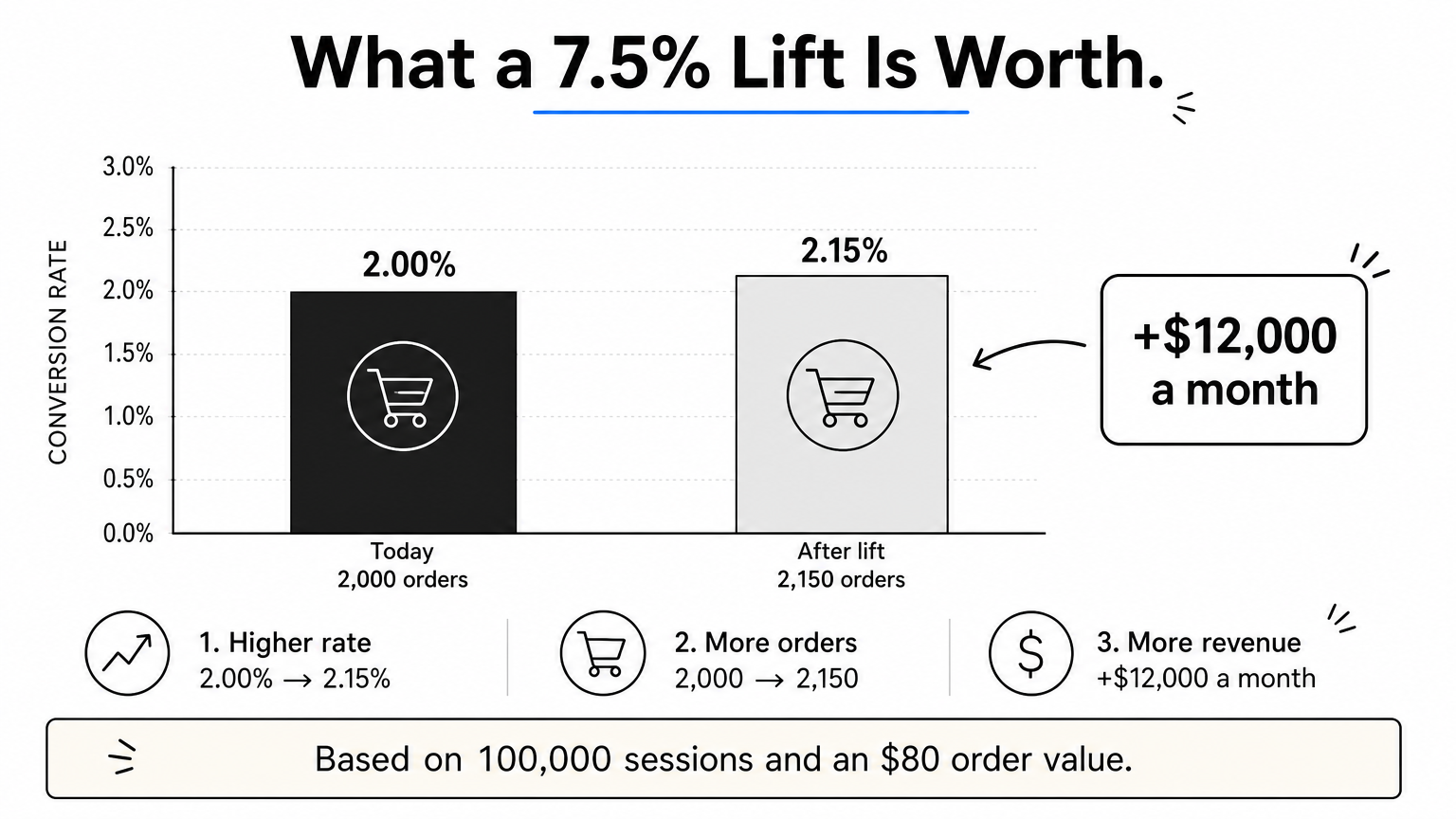
Take a store with 100,000 sessions a month, a 2% conversion rate, and an $80 average order value. That is 2,000 orders and $160,000 in revenue. A 7.5% relative lift moves the rate from 2.00% to 2.15%. You gain 150 orders, or $12,000 a month. Note that this is a relative lift, not 7.5 percentage points.
Divide completed orders by the sessions that reached checkout, and track that next to your overall store conversion rate. The two numbers answer different questions, and you need both to judge the layout.
Your Shopify analytics funnel shows sessions that added to cart, reached checkout, and completed checkout.
So what should your rate be? Aim for the 1.5% to 2.5% band, then compare yourself to your own history, not to strangers.
If you change layouts, run each version for full weeks, ideally two to four, so weekday patterns cancel out. Keep promotions, ad mix, and shipping offers steady across both periods. Filter out bot sessions too. They inflate your denominator and make any layout look worse than it is.
Measure checkout completion by device over full weeks, or you are comparing noise.
Fix the friction inside the form first, then speed up the pages that lead into it. The layout is already decided, so the gains now come from what shoppers see and how fast they arrive.
A single page shows everything at once, so every unnecessary element costs you more. These changes pay off most:
Shopify hosts checkout itself, but every product and cart page before it is yours. Slow pages lose shoppers before they ever reach the form. Nostra's Dash agent accelerates storefront pages at the edge, with up to 47% faster load times and an expected 3% revenue lift across our brands. Full acceleration takes about two weeks.
Shoppers who bounce on a slow product page never see your checkout at all.
One page is not always better, and its numbers can mislead you. Know the exceptions, and know what distorts your data.
Some shoppers prefer a structured flow, and Shopify merchants in community discussions say so. A long single page can feel heavy on a phone, especially with many shipping options or custom fields. If your mobile completion rate falls after you move to one page, test it before assuming the layout is to blame. Otherwise, don't spend effort reverting. Optimizing the form usually beats switching layouts.
Bot sessions inflate traffic and drag your conversion rate down. Knox, Nostra's bot agent, blocks malicious bots before they distort analytics or waste ad spend. Bugs do the same damage quietly. Patch tests the full journey from homepage to checkout on real desktop and mobile devices, in Chrome and Safari on iOS and Android, and files reports with reproduction steps and video.
A conversion rate is only as honest as the traffic and the site underneath it.
One-page checkout is the Shopify default, and the honest data supports a modest lift, not a miracle. The big figures you see compare platforms or payment methods. Measure your own checkout completion rate by device over full weeks, trim the form, and speed up the pages before it.
Then make sure the number you measure is real. Bad bot traffic inflates sessions and hides what your shoppers actually do. If you want cleaner data and protected ad spend, see how Edge Protect filters bad bots before they reach your storefront.


