If you want search engine optimization AI free of charge, build a small stack instead of hunting for one perfect tool. Google Search Console and Bing Webmaster Tools give you real data. A free Semrush account or Ahrefs Webmaster Tools covers keyword and site checks. A free ChatGPT or Claude plan turns that data into briefs and drafts. If AI search visibility is your priority, add Bing's AI Performance report and Frase's GEO checker. If you need search volume you can trust, use Google Keyword Planner.
The trouble is that "free AI SEO" results mix real tools with demos built to collect your email address. Some tools stop working after a few searches. Others do one narrow job. AI assistants will also invent keyword volumes with total confidence. You end up with ten browser tabs and no clear process.
This list sorts ten free options by what they do, who they suit, and where the free plan stops. At Nostra AI we work with ecommerce brands on site speed, bot filtering, and AI crawler traffic, so we judge SEO tools by what the data is worth and what it cannot see. You will also find a comparison table and a workflow that links the tools together.
AI can handle the repetitive work in SEO, but it can't supply the evidence and experience that make a page rank. It drafts outlines, groups keywords, rewrites titles, summarizes competing pages, and flags missing tags. It can't see your real rankings, it doesn't know true search volume, and it has never used your product.
Google's position is practical. Its guidance on helpful, people-first content says that using automation mainly to manipulate rankings violates its spam policies. So use AI to speed up steps, then add what only you know: your data, your photos, and your customers' real questions.
AI speeds up SEO work, but it can't replace the first-hand knowledge that earns a ranking.
Free comes in four kinds, and mixing them up leads to disappointment. Permanent free tools like Search Console have no caps. Capped free plans, like Semrush's, give you a few lookups per day. Open micro-tools need no account but do one narrow job. Free tiers of general assistants, such as ChatGPT and Claude, come with usage limits that change over time.
Skip anything that asks for a credit card to start a seven-day trial. That is a sales funnel, not a free tool, and this list leaves those out.
Each pick had to pass four tests, and each one maps to a job you probably have: keyword research, content optimization, or AI search visibility.
Free limits change, so check each vendor's current page before you build a process around a number you read here.
Google Search Console shows which queries put your pages in front of searchers, how many people clicked, and where you ranked on average. It is free, has no usage cap, and is the only tool that reports Google's own data about your site. It is not an AI tool, but every AI workflow below gets sharper when you feed it your real queries from here.
Five reports matter most:
Every site owner should install it first. For ecommerce stores, the Page indexing report matters most. A status like "Crawled - currently not indexed" often points to thin pages or rendering trouble, and JavaScript-heavy storefronts are prone to the second. Nostra AI's Edge Optimization targets that case. It sends search bots to a version of the site without JavaScript and serves prerendered, cached pages, so new and edited pages get indexed faster.
For content sites, the Performance report doubles as a free keyword research tool. Filter for queries where you rank between positions 8 and 20 and have decent impressions. Those pages sit close to page one, and they are your cheapest wins.
Start with Search Console, because every other tool here is guessing about Google and this one isn't.
Nothing in Search Console is paywalled. The catches are about the data. It keeps 16 months of history, so export your numbers if you want long-term trends. Google also anonymizes rare queries, so query totals never match page totals exactly.
Google counts appearances in its AI features within the regular Web search numbers, so you can't cleanly isolate them. And the tool tells you what is wrong, not how to fix it. That gap is where a free AI assistant earns its place, which is why it shows up as item 9.
Bing Webmaster Tools is Microsoft's free counterpart to Search Console, and it now includes an AI Performance report that shows how your pages are cited in Microsoft's AI answers. You see which pages get cited and for which topics. Few free tools give you citation data straight from the company that generates the answers.
Beyond that report, you get:
It suits anyone who wants AI visibility data without paying for a tracker. Publishers and ecommerce brands benefit most, because citations tell you which of your pages AI systems trust enough to quote.
Setup takes about five minutes if you import from Search Console. Then look at the cited pages and topics and compare them with your best Google pages. If a page earns citations but little organic traffic, it probably answers a question well but lacks a title and snippet that win clicks. Fix those first.
Bing's AI Performance report is the closest thing to a free, first-party AI citation tracker.
The report covers Microsoft's AI experiences only. It tells you nothing about ChatGPT, Perplexity, or Google. Bing's share of search is smaller than Google's, so volumes look low next to Search Console. The report is also newer than the rest of the tool, and Microsoft may change what it shows.
Treat it as a directional signal about which content AI systems like, not as a complete picture of AI search. Pair it with the manual checks in item 10.
A free Semrush account gives you a small daily allowance of lookups in a professional-grade keyword and competitor database. The reported limits are 10 queries per day, a site audit of up to 100 pages, and tracking for 10 keywords. You can spend those queries in the Keyword Magic Tool for keyword ideas or in Domain Overview to see where a competitor gets traffic.
The data quality is the draw. You get keyword suggestions, difficulty scores, and traffic estimates that Search Console can't provide, because Search Console only knows about your own site.
It suits bloggers, small stores, and freelancers who research a handful of topics per week. The caps punish random browsing and reward planning. Here is one sensible way to spend a day's 10 queries:
| Use | Queries |
|---|---|
| Seed keywords in Keyword Magic Tool | 3 |
| Competitor Domain Overview checks | 3 |
| Follow-up lookups on promising terms | 3 |
| Reserve for a surprise | 1 |
Do the research in one focused session, save the results in a spreadsheet, and write from that sheet for the rest of the week.
Plan your daily queries before you log in, because the free cap runs out fast.
The cap is the main catch. Once you hit it, the tool locks until the next day. Paid plans run well over $100 per month, which is a big jump for what you get beyond the free tier. Some features are visible but locked, which can be frustrating.
Also remember that third-party volume and traffic numbers are estimates. Use them to compare terms against each other, not as exact forecasts. Cross-check the terms you care about in Google Keyword Planner (item 5).
Ahrefs Webmaster Tools is free for verified site owners and gives you a site audit, a backlink report, and the organic keywords your site already ranks for. It is not an AI writing tool. Its value is clean, well-organized data about your own site that an AI assistant can then help you prioritize.
You verify a site you own, then get:
It suits site owners who want a deeper crawl than Search Console offers, especially when a site has grown messy. An ecommerce store with thousands of product and collection URLs often hides duplicate titles, redirect chains, and orphaned pages. The audit surfaces those.
A good use of AI here: export the issue list and paste a sample into a free assistant with the prompt "group these by root cause and tell me what to fix first." Always check its suggestions against the audit before you act, because assistants sometimes misread technical issues.
Use Ahrefs Webmaster Tools as the free crawler and let an AI assistant help you rank the fixes.
The big limit is scope. You can only analyze sites you can verify, so you can't research competitors or look up arbitrary keywords. For that you need item 3 or item 5.
You also don't get Ahrefs' AI visibility features, which sit in its paid plans. Think of this as the best free audit tool in the list, not a full research suite. It earns its spot because technical problems usually block rankings before content quality ever matters.
Google Keyword Planner shows search volume ranges and related keyword ideas straight from Google's ads data. It's free with a Google Ads account, and you can set one up without launching a campaign. Pair it with Google Trends, which shows relative interest on a scale of 0 to 100 and reveals seasonality.
It belongs on an AI list for one reason. AI assistants invent search volumes. Ask one how often "best running shoes for flat feet" is searched, and you'll get a confident number that may be pure fiction. Keyword Planner is where you check it.
It suits anyone using AI to generate keyword ideas. The routine is simple: let the assistant brainstorm 30 phrases, then paste the shortlist into Keyword Planner and drop anything with negligible volume. Use Trends to see whether a topic is rising or fading, and to time seasonal content before the peak.
Ecommerce teams get extra value here. Product-led terms like "wool overshirt men" often have clear commercial intent and show up with solid volume, while the same AI assistant might push you toward vague, informational phrases.
Never trust an AI-supplied search volume until Keyword Planner agrees with it.
Accounts with little or no ad spend see broad volume ranges instead of exact numbers, for example 1K to 10K. That is fine for deciding whether a term is worth targeting, but poor for fine comparisons between two close terms.
Keyword Planner also reports competition for advertisers, not SEO difficulty. A term with low ad competition can still be very hard to rank for. Combine it with the Semrush difficulty score or your own check of who ranks on page one.
AIOSEO's free SEO Analyzer audits a single URL in seconds and returns a score out of 100 plus a checklist of what to fix. You paste a link and get results. It needs no signup, and it has no usage limit.
The report covers the on-page basics:
It suits beginners and busy publishers who want a quick pre-publish check. The language is plain, and the recommendations are easy to act on without SEO training. Run it on your draft URL, fix the flagged items, and move on.
It also works as a sanity check on templates. If one product page gets a missing-meta-description warning, check a few others. The same gap probably repeats across the whole catalog, and fixing the template fixes hundreds of pages at once.
A checklist score is a floor, not a plan, so fix the warnings and stop chasing 100.
The tool analyzes one page at a time. It can't crawl a whole site, so it won't catch site-wide patterns the way Ahrefs Webmaster Tools does. The score is also the vendor's own model, not a Google metric, and no search engine uses it.
Speed advice from a third-party analyzer should be treated as a pointer. For real performance data, check the Core Web Vitals report in Search Console. A perfect analyzer score doesn't guarantee a page will rank.
seo.ai offers a library of more than 40 free micro-tools that you can use without logging in. Among them are an AI Keyword Tool for ideas, a Paragraph Rewriter for clunky copy, and a SERP Simulator that previews how your title and description will look in Google results. Each one handles a single task.
The library is useful for the small jobs that don't justify opening a big platform. Need to check whether a title will be truncated? Open the simulator. Need three alternative phrasings of an awkward paragraph? Use the rewriter.
It suits writers and solo marketers who want quick, disposable helpers. Bookmark the SERP Simulator in particular. Titles in Google results are cut off at roughly 60 characters, and a preview catches ugly truncation before you publish.
Treat any rewriting tool as a starting point. Rewriters tend to flatten your voice and smooth out the specific details that make a page useful. Use them for a stubborn sentence, not for whole articles, because mass-rewritten text is exactly the thin content Google warns against.
The micro-tools are best as a utility belt for one-off fixes, not a content strategy.
The tools are separate from each other, so you can't chain them into a workflow or save a project. Outputs are generic, because the tools know nothing about your site or customers. The company's main platform is a paid product, and the free tools exist partly to lead you toward it.
That is a fair trade for a no-login toolbox, as long as you stay aware of it. Use these for speed on small tasks and keep your real research in Search Console and Keyword Planner.
Frase's free GEO Score Checker grades a URL on how ready it is to be cited by AI answer engines. It looks at authority, readability, and structure, and returns a score with improvement hints. Frase's free tools page also lists checks for whether ChatGPT, Perplexity, and Gemini cite your domain and whether AI agents can read your page.
GEO means generative engine optimization, the practice of shaping content so AI systems quote it. A structure check is a reasonable first step, because answers that sit under clear headings and open with a direct statement are easier for any system to extract.
It suits content teams starting on AI search visibility who want a baseline before spending money. Run your five best pages through it and compare scores. Pages with weak structure usually share the same flaws: vague headings, long paragraphs, and answers buried far below the question.
A good test is to read your top section out loud. If the first two sentences don't answer the heading, rewrite them. That one change improves both human readability and extractability.
Put the direct answer in the first sentence under each heading, and both readers and AI systems will find it.
The checker is diagnostic only. It scores the page but doesn't fix it, so you need an editor or an assistant for the rewrite. The score is also a vendor heuristic, not a Google signal.
Google's own documentation on AI features and your website says that no special optimization is needed. Pages must be indexed and eligible to show with a snippet, and the usual SEO fundamentals apply. So use the GEO score to review clarity and structure, and don't treat it as a secret ranking lever.
The free tiers of general AI assistants like ChatGPT and Claude handle the thinking-and-writing side of SEO. They draft briefs and outlines, suggest title and meta description variants, generate FAQ ideas, draft JSON-LD schema, and cluster keyword lists. They are the most flexible tools on this list and the easiest to misuse.
Their weakness is that they know nothing about your site unless you paste data in. The best results come from combining them with real exports from item 1. Here is a prompt you can copy:
You are an SEO analyst. Below are search queries from my Google Search Console export for an ecommerce site that sells [product category]. Group them into 5 to 8 topic clusters by search intent. For each cluster, give: a cluster name, the dominant intent (informational, commercial, or transactional), the one query with the most impressions, and a suggested page type (blog post, category page, product page, or FAQ). Do not invent search volumes.

Queries (query, clicks, impressions, average position):
[paste 100 to 300 rows here]
It suits anyone with more ideas than time. A small team can turn a 300-row query export into a content plan in an afternoon. The assistant sorts, you decide. Add your own product knowledge, customer questions, and photos to anything it drafts.
The failure mode is publishing raw output. Unedited AI text reads generic, repeats what already ranks, and often includes statistics that don't exist. That is the kind of page Google's guidance warns against.
Give the assistant your data and your judgment, and it saves hours; give it neither, and it produces filler.
Free plans have usage caps and model limits that change without notice, so a long session may stop midway. Assistants can't see live Google results unless they search the web, and they still can't see your Search Console. They also make things up.
Verify every number, name, and claim before it goes live. Never ask for search volumes or difficulty scores and then trust the reply. Use item 5 for volume and your own review of page one for difficulty.
Google AI Mode, Perplexity, ChatGPT search, and Microsoft Copilot are free to use at a basic level, and together they work as a manual AI visibility tracker. You ask the questions your customers ask and record whether your brand or pages appear in the answers and which sources get cited. Perplexity lists numbered sources with every answer, which makes citations easy to read.
Which one is best? Use the ones your buyers use. Google AI Mode has the largest audience. Perplexity makes sources easiest to audit. ChatGPT search matters for conversational shoppers. Check all three, because each one cites different pages.
It suits small teams that can't afford a tracker but need to know where they stand. Build a simple sheet with these columns and fill it monthly:
Start with 15 to 20 questions that mirror real buying and research queries, such as "best vegan moisturizer for dry skin" for a skincare store. Repeat each one twice, because answers shift between runs.
One AI answer is an anecdote; the same question asked monthly is a trend.
Manual checks are slow, and results vary by wording, location, and the moment you ask. You can't treat any single answer as a ranking. There is also no automation in the free tier.
There is a second blind spot. Manual checks show what AI says about you, not which AI crawlers actually visit your store. Sherlock, the AI discovery agent behind Nostra AI's Edge Detect, identifies and verifies AI crawlers and bots visiting a storefront and streams that data to AEO and analytics tools. That is a different category from a free checklist. It matters if you want your AEO tools to work from complete bot data instead of a sample.
This table puts the ten tools together so you can see the trade-offs at a glance. Limits come from the vendors' free offerings as described above, so confirm current terms before you commit.
| Tool | Best for | Account needed | Free limit to know |
|---|---|---|---|
| Google Search Console | Real Google query and indexing data | Google account, verified site | No cap, 16 months of history |
| Bing Webmaster Tools | AI citation data from Microsoft | Microsoft account, verified site | Covers Microsoft's AI only |
| Semrush free account | Keyword and competitor research | Free account | About 10 queries per day |
| Ahrefs Webmaster Tools | Site audit and backlinks | Account, verified site | Your own sites only |
| Google Keyword Planner | Checking search volume | Google Ads account | Broad ranges without ad spend |
| AIOSEO SEO Analyzer | Quick single-page audit | None | One URL at a time |
| seo.ai free tools | One-off micro tasks | None | Tools are disconnected |
| Frase GEO Score Checker | Structure for AI citations | None | Diagnoses, doesn't fix |
| ChatGPT and Claude free | Briefs, clusters, drafts | Free account | Usage caps, invented facts |
| Free AI search engines | Manual citation checks | Varies | Answers vary run to run |
Pick by the job in front of you, not by brand.
If you can only set up three, choose Google Search Console, a free AI assistant, and a free Semrush account. That trio covers real data, content help, and outside research.
The best free AI SEO setup isn't one tool; it's real data, an assistant, and one source of outside research.
Use the tools in this order so each one feeds the next.
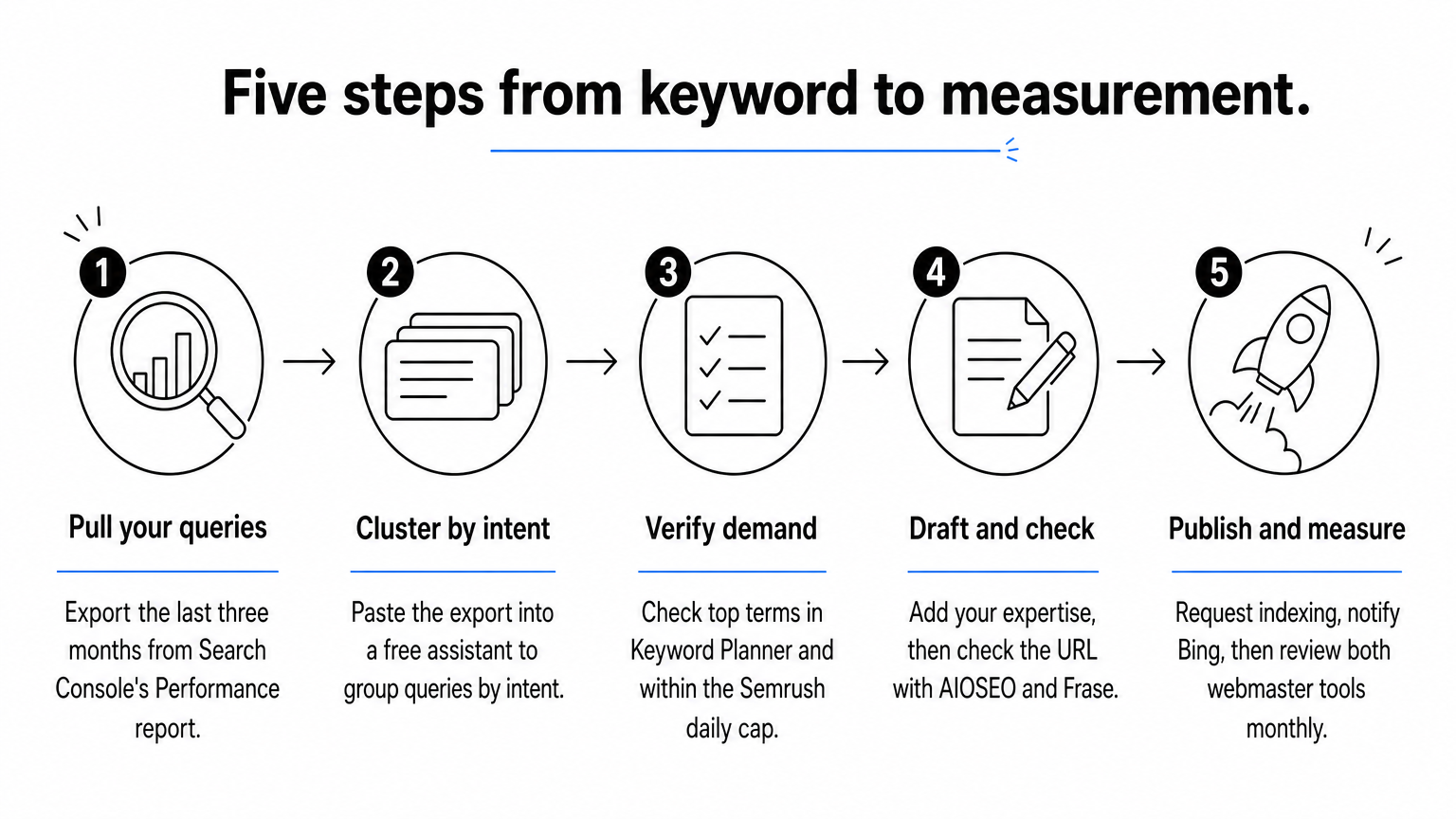
Say you run a store with 40 category pages. In week one you export 300 queries from Search Console and cluster them into 7 topics with an assistant. In week two you verify the 7 head terms in Keyword Planner and spend 7 of one day's 10 Semrush queries on the competitor and difficulty checks. You pick 4 topics with real demand and weak competition.
In weeks three and four you write two articles per week, each with your own product details and photos. You run every page through the analyzer and the GEO checker before publishing. At day 30 you check Search Console for impressions, check Bing for citations, and ask 15 buyer questions in two AI search engines. Four published pages, zero spend, and a baseline to compare against next month.
A repeatable monthly loop beats any one tool, because SEO results come from consistent measurement and improvement.
Free tools stop working when you need daily rank tracking, competitor data at scale, or automated AI visibility tracking across several engines. That is when paid platforms make sense. Until then, the limits above are more of a discipline than a handicap.
Also keep an eye on your analytics. Search Console reports searches, but your session counts and ad data can be inflated by automated traffic. Check that your numbers reflect real shoppers before you trust a conversion rate you built a plan around.
Start with Search Console and Bing Webmaster Tools for real data, add a free AI assistant to turn that data into briefs and drafts, and use Keyword Planner to keep the assistant honest about search volume. Then layer on the Semrush free account, the AIOSEO analyzer, and Frase's checker as your needs grow. Run manual AI searches monthly to see how you appear in answers.
These tools tell you how you show up. They don't tell you who is actually visiting. For ecommerce brands, bad bots can inflate sessions, distort analytics, and burn ad spend. If you want clean traffic data behind your SEO decisions, see how Edge Protect stops AI-powered bad bots before they reach your site.


.svg)
