Automated bots are software programs that perform tasks on the internet without a person driving each step. They follow coded instructions, run on a schedule or react to a trigger, and work much faster than any human. Some do useful jobs, like the crawler that gets your pages into Google. Others scrape your prices, test stolen passwords on your login page, or click your ads. The word bot is short for robot.
The program itself is neutral. Intent decides whether a bot helps or harms, and nearly every website receives both kinds every day. That is why the question matters beyond the definition: if you cannot tell the two apart, you cannot trust your traffic numbers.
This article explains why automated bots matter, how they work, which good and malicious types exist, and how to spot and manage them. We build bot protection for ecommerce storefronts at Nostra AI, so many of the examples come from online stores.
Automated bots matter because they make up a large share of your traffic. They also quietly change the numbers you use to spend ad budget, judge campaigns, and rank in search.
Security vendor studies in recent years have put automated traffic at roughly half of all web requests, with bad bots at more than a third of the total. An online store is rarely an exception. Nostra AI reports blocking more than 10 billion bots a year across its brands, which shows how much unwanted automation a busy storefront attracts.
Bad bots hurt in three ways. They distort your analytics, they waste ad spend, and they attack accounts and checkout pages. Here is a simple illustration. Say you pay $2 per click and buy 10,000 paid clicks a month, so you spend $20,000. If 8% of those clicks come from bots, you waste $1,600 a month, or $19,200 a year. Your conversion rate also looks worse than it really is, so you may cut campaigns that work.
Blocking everything backfires. Googlebot has to reach your pages to index them, and AI crawlers influence whether your products show up in AI-generated answers. A store that blocks all automation disappears from the places shoppers now search.
The goal is not to block all bots, but to tell the good ones from the bad ones.
An automated bot is a script that sends requests to a website, app, or API, reads the response, and acts on it in a loop. No person sits between the steps, and that is what makes bots fast and cheap to run at scale.
Almost every bot repeats the same cycle:
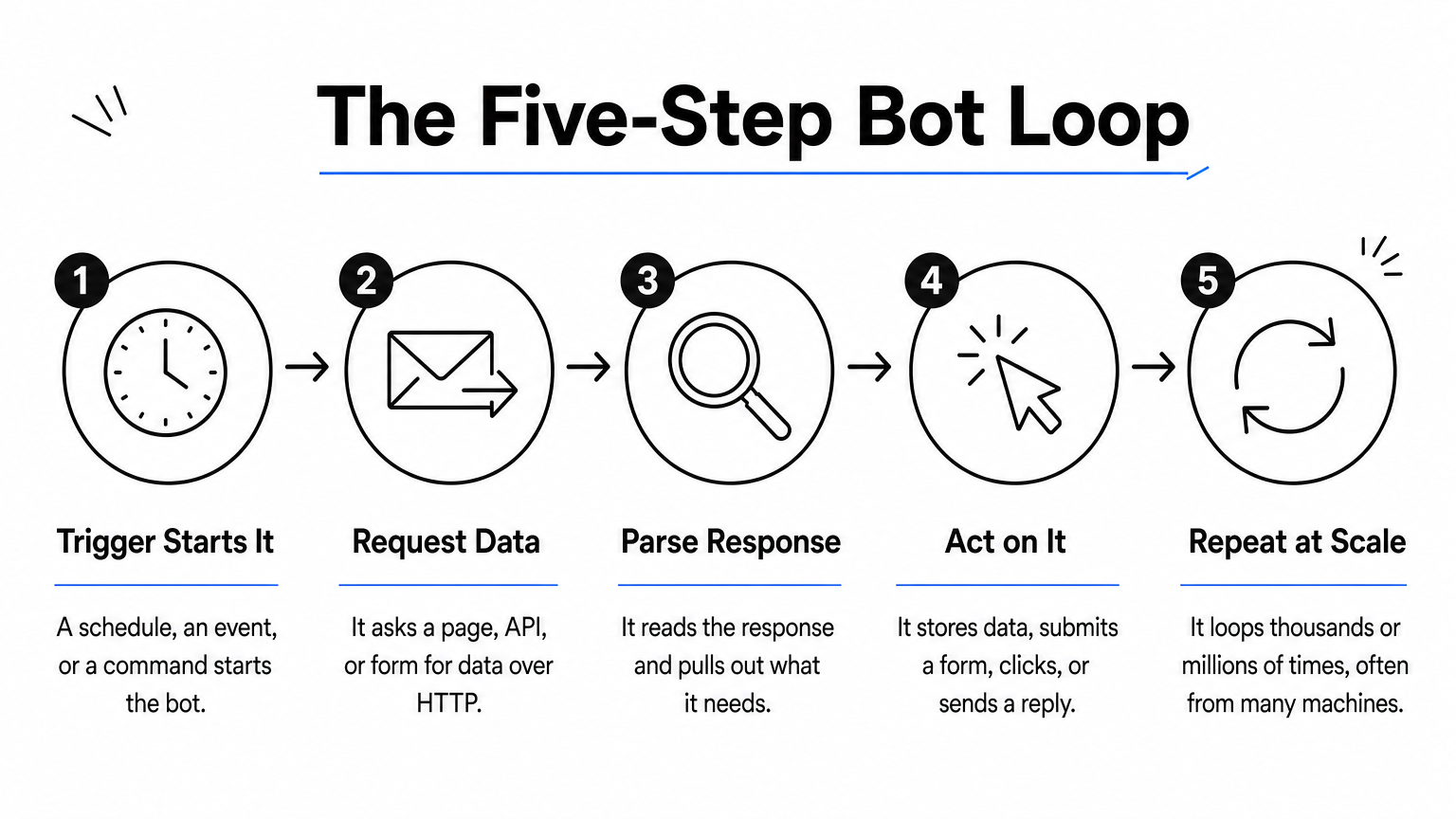
A chatbot follows the same pattern. The trigger is your message, and the action is a generated reply.
Simple bots run fixed rules from a single address and often announce themselves in a user agent string. Advanced bots imitate people. They run real browsers without a visible window, rotate through thousands of IP addresses, and fake mouse movement and typing delays. Newer ones use AI to adapt to the page in front of them.
| Trait | Simple bot | Advanced bot |
|---|---|---|
| Logic | Fixed script | Adapts to the page, sometimes AI-driven |
| Origin | One or few IP addresses | Rotating, often residential IPs |
| Identity | Declares itself or is easy to fingerprint | Mimics a real browser and user |
| Detection | Rate limits and user agent rules | Behavior analysis and verification |
The harder a bot works to look human, the more likely it has something to hide.
Good bots do useful work, usually identify themselves honestly, and respect the rules in your robots.txt file. Most come from search engines, AI companies, and the tools you pay for.
| Type | Example | What it does |
|---|---|---|
| Search crawler | Googlebot | Reads and indexes your pages for search results |
| AI crawler | ChatGPT and Claude crawlers | Collect content that AI assistants can cite |
| Monitoring bot | Uptime checkers | Ping your site and alert you when it goes down |
| Feed bot | Shopping and price feeds | Pull product data into comparison platforms |
These bots are verifiable. Their operators publish how to confirm a visit is real, which separates them from impostors that copy the same name.
Chatbots answer questions in a chat window or voice assistant, from store support widgets to AI assistants. RPA bots, short for robotic process automation, sit inside company systems. They copy invoices between tools, update records, and run repetitive back-office work. Neither touches your site as a visitor, but both fit the definition: software doing a task with no human in the loop.
A good bot tells you who it is, and you can check.
Malicious bots automate what an attacker would otherwise do by hand, so one person can hit thousands of targets at once. Their goal is money, data, or disruption.
Bots are dangerous when their purpose is fraud, theft, or overload. Account takeover and card testing cause real financial harm, and even mild scraping erodes your pricing edge.
Trading bots are a different case. They place buy and sell orders by preset rules, and legitimate software exists. But no bot guarantees profit, because markets carry risk that automation cannot remove. Treat any product that promises fixed returns as a red flag.
A bot is only as dangerous as the job its owner gave it.
You spot bot traffic by looking for patterns no human would produce, then verify the bots that claim to be friendly and filter the rest before they reach your analytics.
Check your analytics for these signals:
Step four is what Knox, the bot agent behind Nostra AI's Edge Protect, does. It blocks malicious bots at the edge and lets verified crawlers such as Googlebot, ChatGPT, and Claude through.
On social media or in chat, instant replies at any hour and generic, repetitive answers point to a bot. So does dodging personal details or a brand-new account posting at high volume. Ask an odd, specific question and see if the answer fits. Modern AI bots are convincing, so treat these as hints, not proof.
You cannot manage bot traffic you have not measured, so start with the data.
Automated bots are programs that do tasks without a person behind each step. Search crawlers, AI crawlers, monitors, and chatbots help you. Scrapers, credential stuffers, and click fraud bots cost you money. The skill that matters is separating them: verify the friendly ones, watch your data for odd patterns, and filter the rest.
If bots are distorting your analytics or eating your ad budget, see how Edge Protect filters bad bots before they reach your store. It goes live in under a day with no code changes, and you can try it free for 14 days.


